iOS 26 Apple Music Features: What Changed and What Still Has Limits

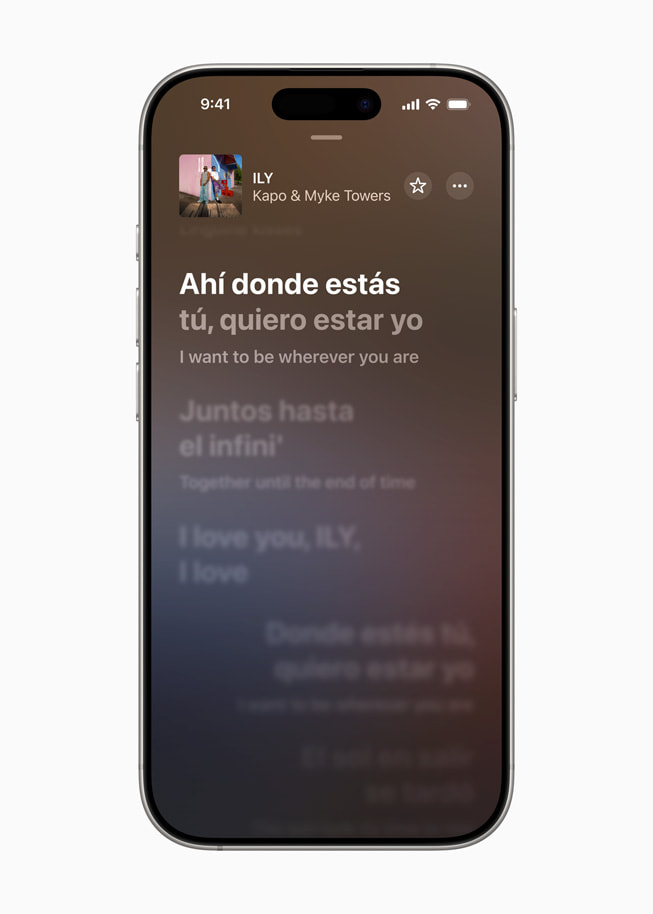
TL;DR: iOS 26 Apple Music features include AutoMix, Lyrics Translation, Lyrics Pronunciation, playlist organization updates, Playlist Playground beta in iOS 26.4, offline lyrics for downloaded songs, Offline Music Recognition, richer visuals, Concerts, and Apple Music Sing with iPhone as a mic on Apple TV. Most features come from Apple Music itself. They do not fix local MP3, FLAC, AAC, ringtone, or video transfer to iPhone.
#tldr
Apple Music changed enough in iOS 26 that a normal release-note skim is annoying. Apple split the useful details across Apple Music for Artists, iOS update notes, the iPhone User Guide, and Newsroom posts. This page pulls the Apple-confirmed Apple Music iOS 26 changes into one clean list, with caveats next to the feature instead of buried 9 scrolls later.
The short answer: Apple Music on iOS 26 is better for transitions, lyrics, playlist discovery, visuals, and concert context. It is still not a magic local-file manager. If your problem is moving old MP3 or FLAC files onto an iPhone, skip to the section on local music limits and WALTR PRO.
Before we begin
Download WALTR PRO on Mac or Windows to put your own local music files on an iPhone or iPad when Apple Music does not cover that workflow. Connect the device, then transfer the tracks you already own to its native Music app.
Quick takeaways for iOS 26 Apple Music features
AutoMix is Apple Music's new DJ-style transition mode, and Apple says it is on by default.
Lyrics Translation and Lyrics Pronunciation work only when supported lyrics are available for a song.
iOS 26.4 adds Playlist Playground beta, Concerts, Offline Music Recognition, Ambient Music widget, and full-screen album or playlist backgrounds.
iOS 26.2 adds offline lyrics for downloaded songs and places Favorite Songs in Top Picks.
Apple Music Sing can use an iPhone as a mic for Apple TV, but Apple says it needs the latest Apple TV.
iOS 26 does not transfer local MP3, FLAC, AAC, MKV, PDFs, or ringtones to iPhone for you.
iOS 26 Apple Music features at a glance
Use this table when you want the feature list without reading every Apple release note. The important part is not just what Apple added, but which iOS 26 update added it and what the catch is.
Feature | Added in | What it does | Main caveat |
|---|---|---|---|
AutoMix | iOS 26 | Smooths transitions between songs like a DJ mix | Apple does not promise every transition will sound perfect |
Lyrics Translation | iOS 26 | Shows translated lyrics for supported songs | Depends on eligible lyrics |
Lyrics Pronunciation | iOS 26 | Helps listeners sing along in another language | Depends on eligible lyrics |
Playlist Playground beta | iOS 26.4 | Generates a playlist from a description | Beta feature |
Offline lyrics | iOS 26.2 | Shows lyrics for downloaded songs without internet | Requires downloaded songs |
Offline Music Recognition | iOS 26.4 | Identifies songs offline and returns results later | Results arrive when you are back online |
Ambient Music widget | iOS 26.4 | Adds Sleep, Chill, Productivity, and Wellbeing playlists to Home Screen | Curated widget categories only |
Concerts | iOS 26.4 | Finds nearby shows from artists in your library | Availability depends on region and data sources |
Apple Music Sing mic | iOS 26 | Turns iPhone into a mic for Apple Music Sing on Apple TV | Needs latest Apple TV |
AutoMix gives Apple Music smoother song transitions
AutoMix is one of the headline iOS 26 Apple Music features. Apple describes AutoMix as a DJ-like mode that smoothly transitions songs for continuous playback, and Apple says AutoMix is on by default in Apple Music. Source: https://artists.apple.com/support/5550-ios-26-whats-new
AutoMix is not the same as a human DJ reading the room. Think of it as a smarter transition layer for playlists, parties, workouts, and long listening sessions where dead air between tracks feels clumsy. It can make a playlist feel less stitched together.
The honest caveat: Apple does not say every song pair will mix perfectly. If you jump between a quiet acoustic track and a loud club track, AutoMix may still sound like software making a best guess. It is useful. It is not magic.
Lyrics Translation and Lyrics Pronunciation help with supported songs
Lyrics Translation and Lyrics Pronunciation are Apple-confirmed iOS 26 Apple Music features. Apple says artists can make lyrics eligible by submitting original lyrics to Apple Music, and translated lyrics appear in Apple Music lyrics view when a song supports the feature. Source: https://artists.apple.com/support/5550-ios-26-whats-new
That caveat matters. Do not expect every song in your library to show translated lyrics. The feature depends on Apple Music having the right lyrics data and the song being eligible. When it works, it helps 2 groups: listeners who want to understand lyrics in another language, and listeners who want to sing along without butchering every second word.
Apple also highlighted Lyrics Translation and Lyrics Pronunciation in its iOS 26 launch coverage, which makes these features safe to treat as core Apple Music iOS 26 changes. Source: https://www.apple.com/newsroom/2025/06/apple-elevates-the-iphone-experience-with-ios-26/
Playlist folders, pins, and Playlist Playground change music organization
Apple Music iOS 26 puts more attention on playlist organization. Users searching for iOS 26 playlist folders are not asking for a philosophy lecture. They want to know whether Apple Music is less messy now.
The practical answer: iOS 26 improves Apple Music organization, but the exact feature set depends on the update and where Apple exposes it. The broader iOS 26 conversation includes playlist folders and pinned music, while Apple Support specifically confirms Playlist Playground beta in iOS 26.4.
Playlist Playground beta generates a playlist from your description, including a title, description, and tracklist. That is useful when you know the mood but do not want to build the whole list by hand. Because Apple calls it beta, treat the output as a draft playlist, not a perfect taste machine. Source: https://support.apple.com/en-us/123075
If you want deeper playlist rules and library logic, Softorino already has a separate guide on how Apple Music Smart Playlists work: https://softorino.com/blog/how-smart-playlists-work-in-apple-music
Offline lyrics and Offline Music Recognition make Apple Music less dependent on signal
Two iOS 26 Apple Music features matter when your internet connection is bad: offline lyrics and Offline Music Recognition. Apple Support says iOS 26.2 adds offline lyrics for downloaded songs. Apple Support also says iOS 26.4 adds Offline Music Recognition in Control Center, which can identify songs without internet and deliver results when you are back online. Source: https://support.apple.com/en-us/123075
That distinction is easy to miss. Offline lyrics are for songs you downloaded. Offline Music Recognition is for identifying music around you when your iPhone has no connection. It stores the recognition attempt and gives the result after the iPhone reconnects.
This is the kind of feature that looks small until you need it. A flight, basement gym, subway platform, hotel lobby, or bad festival signal is exactly where music features usually fail. Apple made those moments less dumb.
Liquid Glass, full-screen artwork, and widgets change the look
iOS 26 also changes how Apple Music looks. Apple introduced the broader Liquid Glass design across iOS 26, and Apple Support says iOS 26.4 gives album and playlist pages full-screen backgrounds for a more immersive look. Source: https://support.apple.com/en-us/123075
Visual changes rarely matter as much as playback and library features. Still, music apps live on mood. Bigger artwork, full-screen album pages, and the Ambient Music widget make Apple Music feel more like a place you open on purpose, not just a player buried behind the Lock Screen.
The Ambient Music widget is narrow by design. Apple lists Sleep, Chill, Productivity, and Wellbeing. That is not a custom DJ in widget form. It is a quick entry point into Apple's curated music lanes.
Concerts, Photos, and Apple Music Sing connect music to real events
iOS 26 also pushes Apple Music beyond the player. Apple says Photos can show a ticket icon on concert photos and videos, then open a concert event page with event details, Apple Music playlists, upcoming shows, and more.
Apple also says Set List playlists from Apple Music for Artists can appear on related event pages when concert dates come from Bandsintown or Ticketmaster. Source: https://artists.apple.com/support/5550-ios-26-whats-new
Apple Support says iOS 26.4 adds Concerts in Apple Music, which helps users discover nearby shows from artists in their library and recommends new artists based on listening. Source: https://support.apple.com/en-us/123075
Apple Music Sing also gets a living-room feature. Apple says you can use an iPhone as a mic for Apple Music Sing on Apple TV. The setup is simple: start Sing on Apple TV, then accept the invite banner on iPhone. The catch is hardware. Apple says the feature is available on the latest Apple TV.
What iOS 26 Apple Music still does not fix for local files
iOS 26 improves Apple Music. It does not remove Apple's old local-file headache. If you have your own MP3, FLAC, AAC, MKV, AVI, MP4, PDF, or ringtone files, Apple Music features do not suddenly make file transfer simple.
This is where Softorino has a real, but narrow, product fit. WALTR PRO is not an Apple Music subscription tool. It does not download Apple Music catalog songs, remove DRM, or unlock paid streaming tracks.
It transfers local files from Mac or Windows to iPhone or iPad, including music, videos, PDFs, and ringtones. WALTR PRO can place supported files in native apps like Music, TV, and Books. See WALTR PRO here: https://softorino.com/waltr-pro
Use Apple Music for AutoMix, translated lyrics, playlists, offline lyrics, and concerts. Use WALTR PRO when your problem is local files Apple still makes awkward.
A simple local music workflow after updating to iOS 26
- Install WALTR PRO on your Mac or Windows PC.
- Open WALTR PRO and connect your iPhone or iPad by cable, or use Wi-Fi after setup.
- Drag an MP3, FLAC, or AAC file into WALTR PRO.
- Wait for the transfer to finish.
- Open the Music app on iPhone and check the local file there.
That is the whole bridge. iOS 26 makes Apple Music better for streaming and discovery. WALTR PRO covers the local-file gap Apple still leaves behind.
Who should care about the Apple Music iOS 26 update?
You should care if you use Apple Music daily, build playlists, listen to music in other languages, use downloaded music offline, or go to concerts. iOS 26 is not one giant Music redesign. It is a set of small features that add up.
AutoMix helps playlists feel less abrupt. Lyrics Translation and Pronunciation make global music easier to follow. Playlist Playground beta gives you a faster starting point for mixes. Offline lyrics and Offline Music Recognition help when your connection disappears. Concerts and Photos make live music less isolated from your library.
If you only open Apple Music twice a month, these features will not change your life. If Apple Music is your daily soundtrack, iOS 26 is worth learning.
Frequently asked questions about iOS 26 Apple Music features
Is Apple Music different in iOS 26?
Yes. Apple Music in iOS 26 adds AutoMix, Lyrics Translation, Lyrics Pronunciation, Apple Music Sing with iPhone as a mic on Apple TV, concert links in Photos, and later update features such as Playlist Playground beta, offline lyrics, Offline Music Recognition, Concerts, Ambient Music widget, and full-screen backgrounds.
What are the new Apple Music features in iOS 26?
The main iOS 26 Apple Music features are AutoMix, Lyrics Translation, Lyrics Pronunciation, playlist organization improvements, Playlist Playground beta in iOS 26.4, offline lyrics in iOS 26.2, Offline Music Recognition, Ambient Music widget, Concerts, full-screen album or playlist visuals, and iPhone as a mic for Apple Music Sing on Apple TV.
What changed in Apple Music in iOS 26.4?
Apple Support says iOS 26.4 adds Playlist Playground beta, Concerts, Offline Music Recognition in Control Center, Ambient Music widget, and full-screen album and playlist backgrounds. Playlist Playground is still labeled beta, so treat generated playlists as a starting point.
Does iOS 26 Apple Music have AutoMix?
Yes. Apple says AutoMix operates like a DJ in Apple Music by smoothly transitioning songs for continuous playback. Apple also says AutoMix is on by default in Apple Music. The feature improves transitions, but Apple does not say every song pair will mix perfectly.
Can Apple Music translate lyrics in iOS 26?
Yes, for supported songs. Apple says Lyrics Translation appears in Apple Music lyrics view when a song supports translated lyrics. Apple also says artists can make songs eligible by submitting original lyrics to Apple Music.
Can Apple Music lyrics work offline in iOS 26?
Yes, with a condition. Apple Support says iOS 26.2 adds offline lyrics for downloaded songs. That means the song needs to be downloaded first. It is not a promise that every streamed song will show lyrics without internet.
Can iOS 26 organize Apple Music playlists into folders?
iOS 26 improves Apple Music organization around playlists, pinned music, and playlist generation. Apple Support specifically confirms Playlist Playground beta in iOS 26.4. For rule-based playlist organization, read Softorino's separate Smart Playlists guide.
Does iOS 26 fix local music transfer to iPhone?
No. iOS 26 improves Apple Music features, but it does not make local MP3, FLAC, AAC, video, PDF, or ringtone transfer painless. For that job, WALTR PRO can transfer local files to iPhone or iPad without iTunes or Finder sync.
Bottom line: iOS 26 makes Apple Music better, not unlimited
iOS 26 is a good Apple Music update because it fixes everyday listening friction: dead air between songs, lyrics you cannot understand, playlist busywork, missing offline context, and concert discovery. The best features are practical, not flashy.
The limit is just as important. Apple Music is still Apple Music. It is better at streaming, lyrics, playlists, and discovery. It is not a universal iPhone file-transfer app. If you keep your own music files, use iOS 26 for the Apple Music features and use WALTR PRO for local files Apple still makes annoying.

WALTR PRO
Convert & Push Any File into Any Apple Device
