WALTR PRO vs iMazing: Which iPhone Transfer App Should You Use?

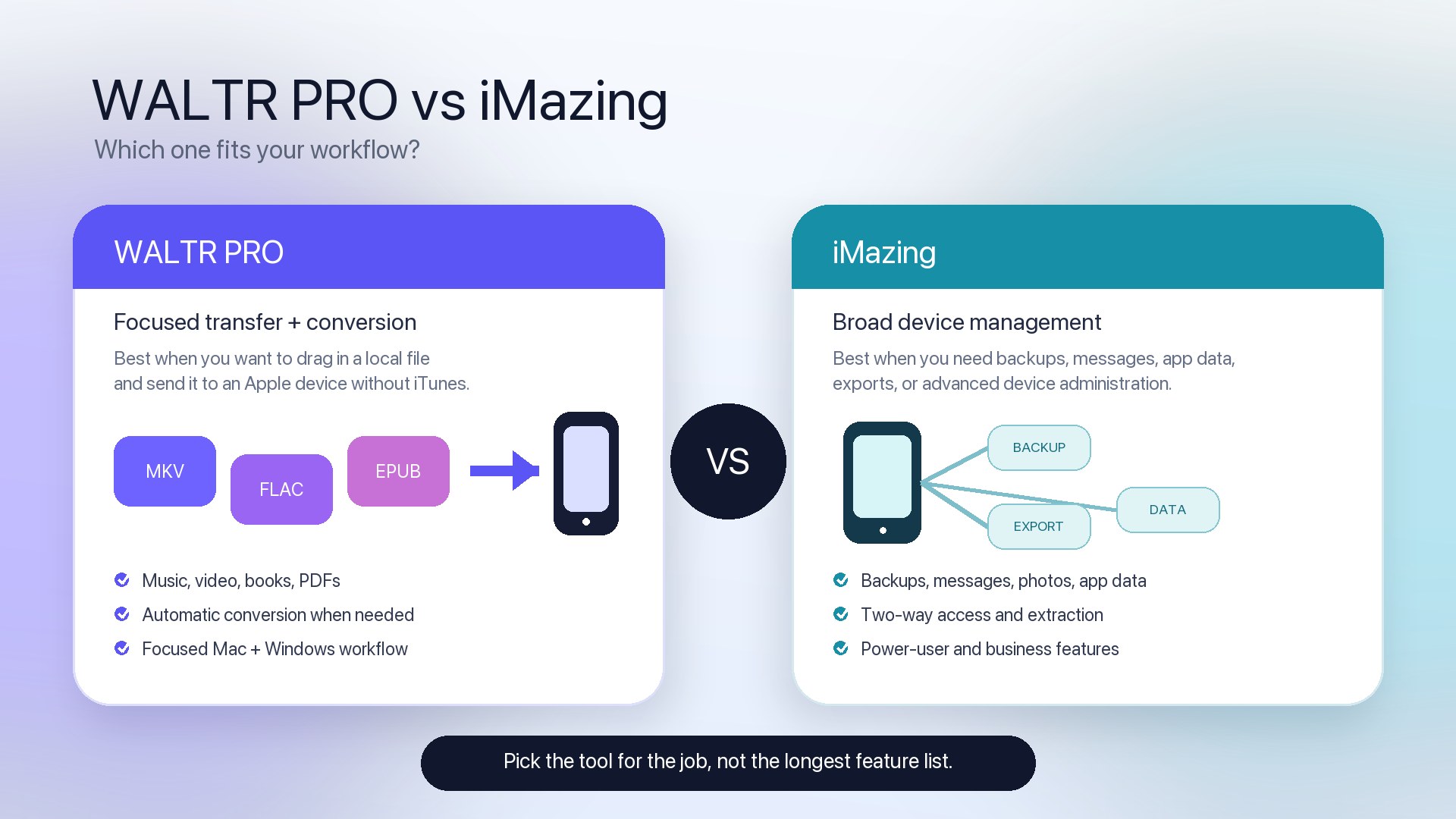
TL;DR: Choose WALTR PRO when your main job is sending local music, videos, ringtones, PDFs, EPUB files, or audiobooks from a Mac or Windows PC to an iPhone or iPad without iTunes. Choose iMazing when you need a broader device-management suite for backups, messages, photos, app data, backup extraction, supervision, or two-way device access. WALTR PRO is the more focused transfer-and-conversion tool; iMazing is the more complete manager. Neither is universally better.
If you searched WALTR PRO vs iMazing, the honest answer is not “one app wins.” They overlap on file transfer, but they are built for different jobs.
WALTR PRO vs iMazing: Quick Takeaways
WALTR PRO is the focused choice for drag-and-drop media transfer and automatic conversion to iPhone-friendly destinations.
iMazing is the broader choice for backups, messages, WhatsApp, photos, app data, backup browsing, device supervision, and management.
iMazing also has Quick Transfer, so it is not fair to say it cannot send files to an iPhone.
Apple’s free tools are enough when your files are compatible and you accept Finder, Apple Devices, AirDrop, iCloud, or app File Sharing workflows.
Performance, reliability, privacy terms, and pricing can change. Check the current product pages and trial terms before buying.
Before we begin
Download WALTR PRO on Mac or Windows when the main job is fast drag-and-drop media transfer to an iPhone, iPad, or iPod. Compare that focused workflow with iMazing’s broader backup and device-management tools before choosing.
WALTR PRO vs iMazing: fair comparison table
Task | WALTR PRO | iMazing | Better fit |
|---|---|---|---|
Send local music, videos, books, PDFs, or ringtones to iPhone | Focused drag-and-drop transfer from Mac or Windows to Apple devices; conversion is part of the workflow for many formats. | Quick Transfer plus category-specific transfer tools inside a broader device manager. | WALTR PRO for the shortest media-transfer path; iMazing when transfer is one part of larger management. |
Convert MKV, AVI, FLAC, OGG, WMA, or other non-native formats during transfer | Built around automatic conversion where supported, with files landing in Music, TV, Books, ringtones, or compatible apps. | Can transfer compatible content and offers iMazing Converter separately, but conversion is not the core Quick Transfer promise. | WALTR PRO for conversion-first transfer. |
Put supported files into native Apple destinations | Core WALTR workflow: music to Music, video to TV, EPUB/PDF/M4B to Books, M4R to ringtone settings. | Supported through Quick Transfer or app/category workflows depending on file type and installed apps. | Compare by exact destination and file type. |
Export messages, WhatsApp, call history, contacts, notes, photos, or app data | Not the job WALTR PRO is built for. | First-party iMazing pages describe broad data browsing, export, backup extraction, and device-management features. | iMazing. |
Scheduled local backups and backup snapshots | No. | Yes. iMazing positions backups, snapshots, browsing, and extraction as core features. | iMazing. |
Simple one-way transfer without maintaining an Apple sync library | Yes. | Yes through Quick Transfer, with a broader interface around it. | WALTR PRO when simplicity and conversion matter most. |
Mac and Windows support | Yes. | Yes. | Tie. |
Free Apple-native route | Finder, Apple Devices, AirDrop, iCloud, or File Sharing may be enough for compatible files. | Same Apple tools may be enough before buying iMazing. | Apple tools when compatibility and sync/file-sharing rules fit. |
Best choice by supported task
Supported task | WALTR PRO | iMazing | Apple free method |
|---|---|---|---|
Transfer MP3/AAC music to iPhone | Yes | Yes | Finder or Apple Devices sync if library sync fits |
Transfer FLAC/OGG/WMA to native Music app | Yes, with conversion where supported | Not the central Quick Transfer promise; verify exact workflow or use a compatible player/converter | Convert first or use a compatible app |
Transfer MKV/AVI/WMV video to iPhone | Yes, with conversion where supported | Can transfer files to compatible apps; verify native playback/conversion path | Convert first, AirDrop compatible files, or use File Sharing with a compatible player |
Transfer EPUB/PDF to Books | Yes | Yes, depending on workflow | Finder/Files/AirDrop may work for compatible apps |
Create/send M4R ringtones | Yes | Quick Transfer page says short tracks can be sent as ringtones | GarageBand/Finder workflows may work but are less direct |
Export iPhone photos/messages/app data | No | Yes | Photos app, Image Capture, iCloud, backups, or Apple export paths depending on data type |
Browse or extract encrypted backups | No | Yes | Finder/Apple Devices can create backups, but not browse them like a dedicated extractor |
When WALTR PRO is the better fit
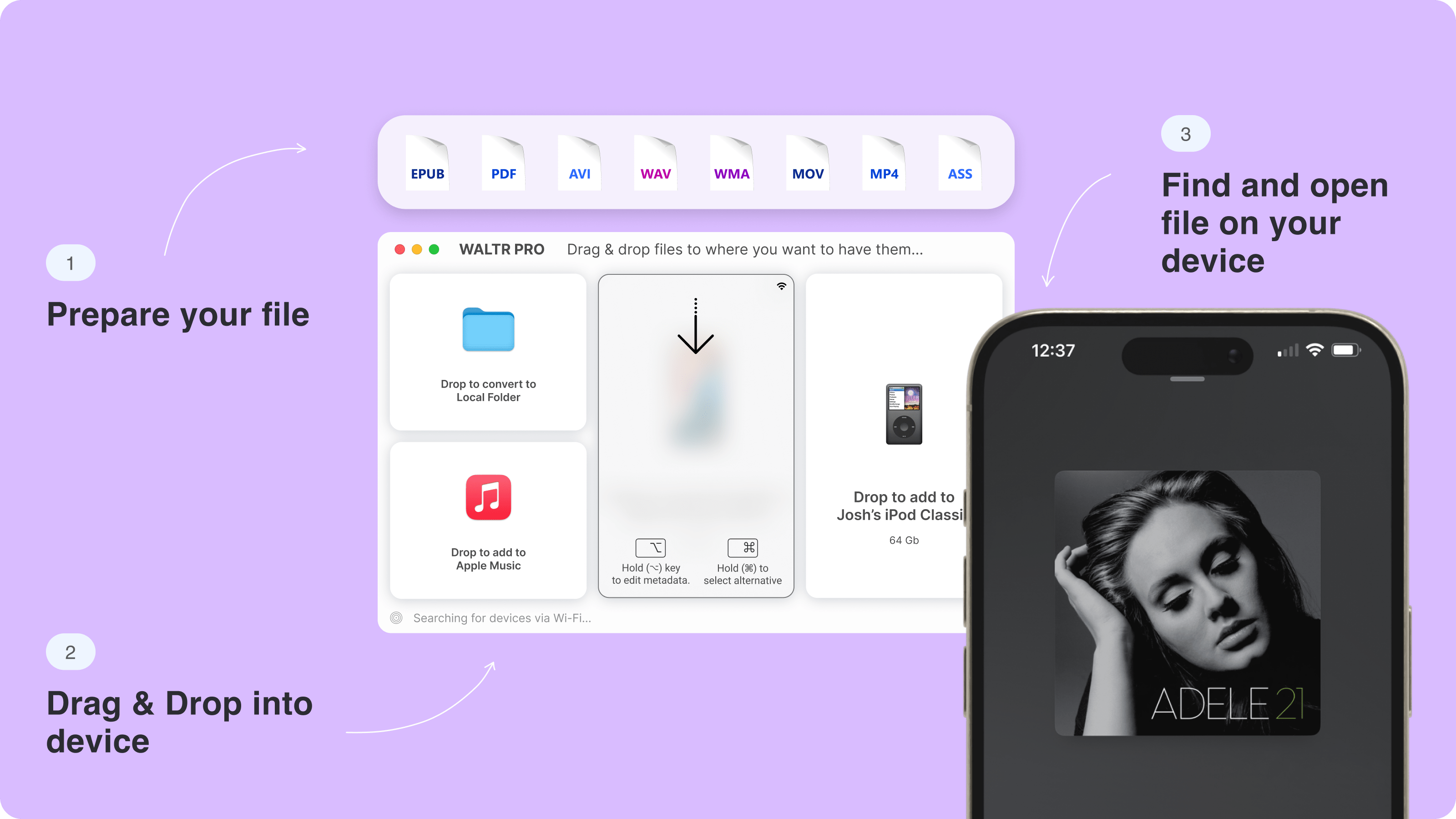
Use WALTR PRO when the job starts with a local file on your Mac or Windows PC and ends with that file on your iPhone or iPad. The app is designed around drag-and-drop transfer, format handling, and clear destinations.
- Send local music, albums, videos, ringtones, PDFs, EPUB files, or audiobooks to an iPhone or iPad.
- Transfer formats such as MKV, AVI, FLAC, OGG, WMA, or EPUB without running a separate converter first, where WALTR PRO supports conversion.
- Keep the workflow simple: connect the device, drop the file, and open the destination app on the iPhone.
- Use USB for large movies or lossless albums when reliability matters more than wireless convenience.
- Start from the product page at https://softorino.com/waltr and confirm destination behavior in WALTR Help: https://help.softorino.com/help/where-to-find-transferred-files-with-waltr-pro
How WALTR PRO handles destinations
WALTR Help says transferred songs can land in Music; videos can appear in TV; EPUB, PDF, and M4B files can appear in Books; M4R files can appear in ringtone settings. That destination clarity is the point of WALTR PRO. It is not trying to be a full iPhone backup browser.
- Music: MP3, AAC, WAV, ALAC, FLAC, OGG, and WMA are covered in the supported-format documentation, with conversion noted for several non-native formats.
- Video: MP4, MOV, MKV, AVI, WMV, FLV, 3GP, TS, and MTS appear in WALTR Help, with non-MP4/MOV formats converted to iOS-compatible video files.
- Books and documents: EPUB and PDF transfer to Books; M4B is treated as an audiobook.
- Ringtones: M4R files go to iPhone ringtone settings.
When iMazing is the better fit
Use iMazing when transfer is only one part of the job. iMazing’s official pages describe a full iPhone, iPad, and iPod manager for Mac and PC with backups, data extraction, media transfer, file transfer, messages, WhatsApp, photos, apps, file system access, supervision, and business workflows.
- Create, schedule, browse, or extract local iPhone backups.
- Export messages, WhatsApp data, call history, contacts, notes, photos, voice memos, or app data.
- Move music from iPhone or iPod back to a computer or rebuild a library.
- Use Quick Transfer when you want iMazing to show compatible destination apps for dropped files.
- Manage several Apple devices or business/IT device workflows.
iMazing Quick Transfer deserves a fair note
Older Softorino copy treated iMazing as if it could not do simple transfer work. That is not fair today. iMazing’s Quick Transfer page says you can drag and drop files and folders to an iPhone or iPad, then choose a compatible app destination. It can handle music, ringtones, photos, movies, books, contacts, and compatible third-party app workflows.
The difference is focus. WALTR PRO centers the transfer-and-conversion path. iMazing puts Quick Transfer inside a much larger device manager.
Apple’s free methods may be enough
Before paying for either app, check whether Apple’s built-in options already solve your specific problem.
- Use Finder on Mac
- Use Apple Devices on Windows
- Use AirDrop or iCloud
- Know the limitation
Limitations of WALTR PRO
- WALTR PRO is not a backup, message-export, WhatsApp, call-history, app-data, supervision, or MDM tool.
- It does not remove DRM, unlock protected files, or make unsupported Apple services accept protected media.
- When a file needs conversion, the destination file may not keep the original container.
- Large transfers are usually better over USB than Wi-Fi.
- The WALTR PRO trial is limited by time and file count; check https://help.softorino.com/help/are-there-any-limitations-in-the-trial-version-of-waltr-pro before testing.
Limitations of iMazing
- iMazing’s broader feature set can be unnecessary if your only job is sending one song, movie, ringtone, or PDF to an iPhone.
- Feature availability and licensing can change, so this rebuild does not publish specific prices.
- Quick Transfer destinations depend on file type and the apps installed on the device.
- iMazing does not magically make every unsupported media container natively playable without conversion or a compatible app.
- A broader dashboard is useful for management work, but it can be extra friction for a simple transfer job.
Simple decision checklist
Choose WALTR PRO if the phrase in your head is: “I just want this local file on my iPhone.”
Choose iMazing if the phrase in your head is: “I need to manage, back up, browse, or export data from this device.”
Choose Apple’s free tools if your files are already compatible and you are comfortable with sync, AirDrop, iCloud, or app File Sharing.
If you need both focused transfer and deep management, compare the exact file destinations and data types before buying either app.
Verdict: focused transfer vs broader iPhone management
WALTR PRO and iMazing are not perfect substitutes. WALTR PRO is narrower by design: it helps move and convert local media and documents to an iPhone or iPad with fewer decisions. iMazing is broader by design: it handles transfer plus backups, exports, device data, app data, and management features.
If you mainly transfer music, movies, ringtones, PDFs, or ebooks, start with WALTR PRO at https://softorino.com/waltr and confirm exact format support at https://help.softorino.com/help/waltr-pro-supported-formats-full-list. If you need backups, messages, WhatsApp, photos, app data, supervision, or backup extraction, start with iMazing’s official feature pages at https://imazing.com/.
FAQ: WALTR PRO vs iMazing
Is WALTR PRO better than iMazing for music and video transfer?
WALTR PRO is usually the better fit when your goal is focused local music or video transfer with conversion into native Apple destinations. iMazing can also transfer music and files, but it is a broader device manager, so it makes more sense when transfer is only one of several tasks.
Can iMazing do everything WALTR PRO does?
No comparison should claim that without testing every format and destination. iMazing has Quick Transfer and media tools, but WALTR PRO is built around transfer and conversion of formats such as MKV, AVI, FLAC, OGG, and WMA where supported. Verify the exact file type before choosing.
Can WALTR PRO back up an iPhone or export messages?
No. WALTR PRO is not a backup extractor, message exporter, WhatsApp exporter, app-data browser, or supervision tool. Choose iMazing if those jobs matter. Choose WALTR PRO when the task is sending supported files from a computer to an iPhone or iPad.
Which app is easier for MKV, AVI, or FLAC files?
WALTR PRO is the clearer fit for MKV, AVI, and FLAC transfer when you want conversion handled during the send-to-iPhone workflow. iMazing may transfer files to compatible apps, but the destination and playback path depend on file compatibility and installed apps.
Do WALTR PRO and iMazing work without iTunes?
Yes. WALTR PRO is explicitly positioned as a no-iTunes drag-and-drop transfer app for Mac and Windows. iMazing also describes transfer, backup, and device-management workflows without relying on iTunes or Finder as the main interface.
Is there a free alternative to WALTR PRO and iMazing?
Yes, sometimes. Apple’s Finder, Apple Devices for Windows, AirDrop, iCloud Drive, and app File Sharing can be enough for compatible files and simple sync or sharing. They are less convenient when you need automatic conversion, native destinations, backup browsing, or deep device export.
Which app should a Windows user choose?
For Windows users, choose WALTR PRO if the job is sending local music, video, PDF, EPUB, or ringtone files to an iPhone. Choose iMazing if you need Windows-based backups, messages, WhatsApp export, photos, app data, or broader iPhone management. Apple Devices is the free first check for compatible music sync.

WALTR PRO
Convert & Push Any File into Any Apple Device
