4K YouTube Downloader for iPhone, Mac, and Windows


TL;DR: A 4K YouTube downloader is only useful when the source video actually has 2160p and the file lands where you need it. Use SYC PRO when you want MP4 or audio on iPhone, iPad, Apple Music, Mac, or Windows without iTunes. Use YouTube Premium when you want the official in-app offline route.
If you searched for a 4K YouTube downloader, the real question is not just “can this app save 4K?” The better question is: where will the file go after download?
A generic downloader can leave a big MP4 in your Downloads folder. Softorino YouTube Converter PRO, also called SYC PRO, is a better fit when you want YouTube video or audio on iPhone, iPad, Apple Music, Mac, or Windows. It handles MP4, MP3, AAC, playlists, subtitles when available, and clean metadata without the old iTunes shuffle.
Before we begin
Download SYC PRO on Mac or Windows to save permitted YouTube videos in up to 4K when the source provides that quality. Choose the resolution before downloading and use only videos you own or have permission to save.
4K YouTube Downloader Quick Takeaways
Pick 4K only when YouTube offers a real 2160p stream for that video.
Use MP4 for video on iPhone, iPad, Mac, Windows, and most TVs.
Use MP3 or AAC when you only need audio in Apple Music or another audio app.
Use SYC PRO when the destination is iPhone, iPad, Apple Music, Mac, or Windows.
Use YouTube Premium when you need YouTube's official offline feature inside the YouTube app.
One legal note before the how-to: download only videos you own, videos you have permission to save, copyright-free or public-domain content, or content the platform allows for offline use. YouTube's Terms of Service and Help Center still apply. Do not use any downloader to bypass access controls, DRM, paid content, or creator rights.
Which 4K YouTube downloader should you use?
Choose a 4K YouTube downloader based on destination, not hype. Most bad downloader workflows fail after the download finishes. The app saves a file, then you still need to move it to your iPhone, fix the name, add it to Apple Music, or find a player that accepts the format.
Use case | Best fit | Why |
|---|---|---|
Download YouTube videos to iPhone or iPad | SYC PRO | Saves MP4 or audio and sends it to Apple devices without iTunes |
Save MP4, MP3, or AAC on Mac or Windows | SYC PRO | Gives format, quality, destination, playlist, subtitle, and metadata control |
Compare many generic desktop downloaders | Broader downloader list | Better when you want a neutral roundup before choosing |
Official offline viewing inside YouTube | YouTube Premium | Platform-approved offline access inside the YouTube app |
Power-user command-line downloads | yt-dlp | Flexible, but not friendly for normal users |
One low-risk clip in low quality | Online converter | Fine for throwaway use, weak for 4K, playlists, and safety |
If your goal is “download YouTube videos to iPhone,” start with SYC PRO. If you want a broader comparison, Softorino also has a guide to the best video downloaders for Mac and Windows.
4K YouTube Downloader vs YTD: what is the real difference?
YTD Video Downloader is mainly about getting YouTube media onto a computer. A strong 4K YouTube downloader needs to do more than place a file in Downloads. It should help you choose quality, format, subtitles, playlist handling, destination, and metadata.
That difference matters. A normal YTD downloader can save an MP4, then leave you with extra work. You may still need Finder sync, a cloud upload, a third-party player, or a manual Apple Music import. That is where the workflow gets annoying.
SYC PRO makes the destination part of the download flow. Copy a YouTube URL, choose MP4, MP3, or AAC, pick iPhone, iPad, Apple Music, Mac, or PC as the destination, edit or fill metadata, then download. No iTunes. No mystery file called videoplayback_final_final.mp4.
Use YTD Video Downloader or another generic downloader when you only need a local desktop file. Use SYC PRO when the file needs to land on an Apple device or inside Apple Music with less cleanup.
Is YTD the same as a 4K YouTube downloader?
YTD can mean YTD Video Downloader, but search results also mix in finance pages, mirror sites, music results, and generic download pages. In this guide, YTD means the YouTube downloader category.
A YTD downloader is not automatically a good 4K YouTube downloader. To save true 4K, the source YouTube video must include a 2160p stream. If the creator uploaded only 1080p, no downloader can create real 4K detail. Upscaling is not the same as downloading real 4K.
Check the YouTube quality menu first. If you see 2160p, the video has a 4K stream. If you only see 1080p or 720p, save that quality and ignore any app that promises magic.
4K files are also large. A long 4K video can eat storage fast, especially if you save a playlist. For phone viewing, 1080p may look sharp enough and save space. For editing, archiving, or watching on a TV, 4K makes more sense.
SYC PRO helps because you choose the quality before downloading. You can save MP4 for broad playback, extract MP3 or AAC for audio, or send the finished file straight to your iPhone, iPad, or Apple Music library.
How to download 4K YouTube videos with SYC PRO
SYC PRO keeps the 4K YouTube downloader workflow simple: paste a link, choose output, choose destination, then download. The useful part is what happens after that. The file can land on your Apple device or in Apple Music instead of sitting in a folder you will forget.
Step 1: Install Softorino YouTube Converter PRO
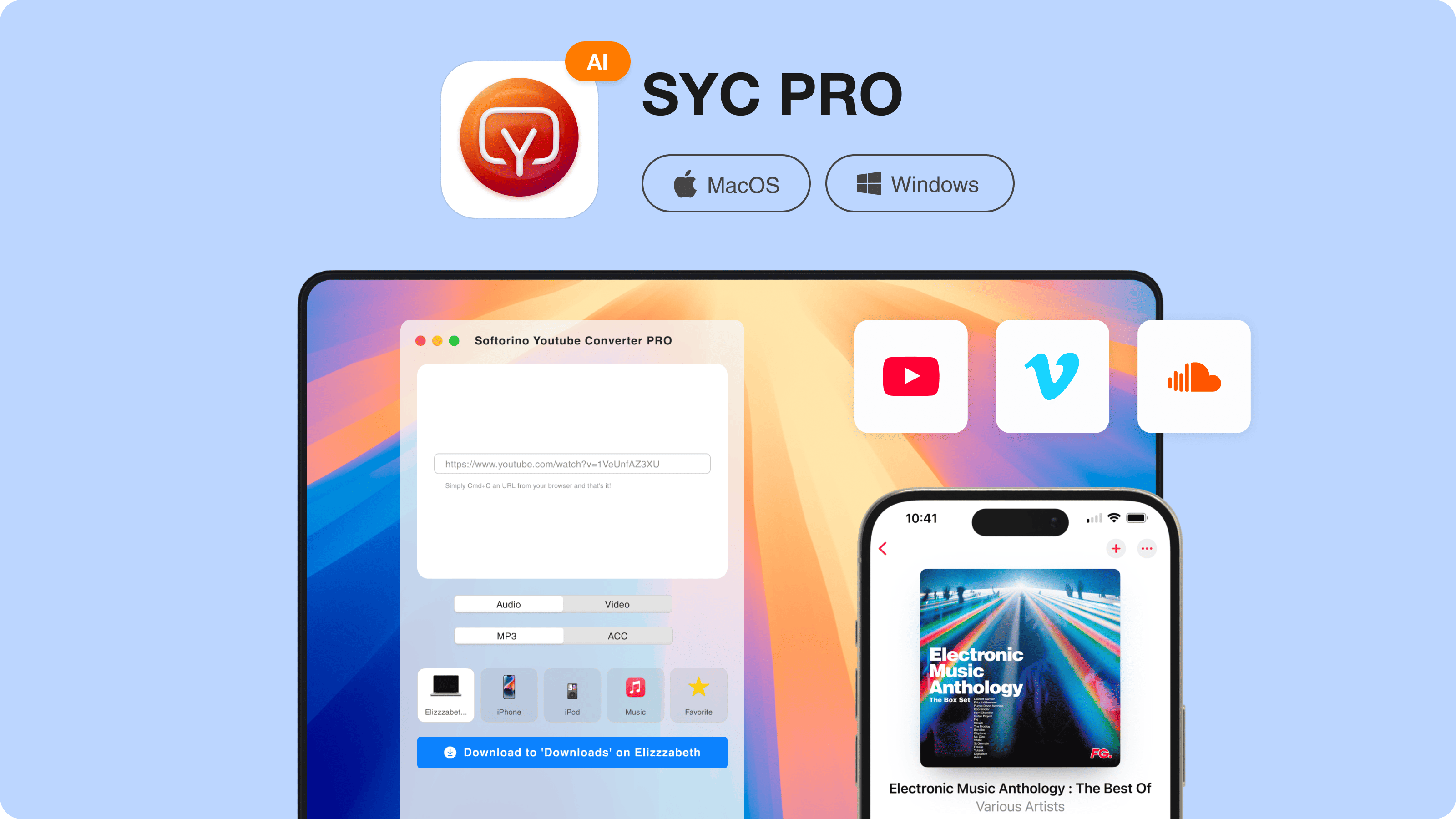
Download and install SYC PRO on your Mac or Windows PC. If you want the video on your iPhone or iPad, connect the device with a USB cable or use the supported Wi-Fi flow. If you only want the file on your computer, skip the device connection.
Open SYC PRO after installation. The app detects your connected Apple device and prepares it as a destination. This is the part that saves you from the old iTunes sync ritual.
Step 2: Copy the YouTube video URL
Open the YouTube video you want to save. Copy the URL from the browser address bar or use YouTube's Share button.
You can also use SYC PRO's built-in browser if you prefer to search from inside the app. That helps when you are collecting several videos and do not want to keep switching windows.
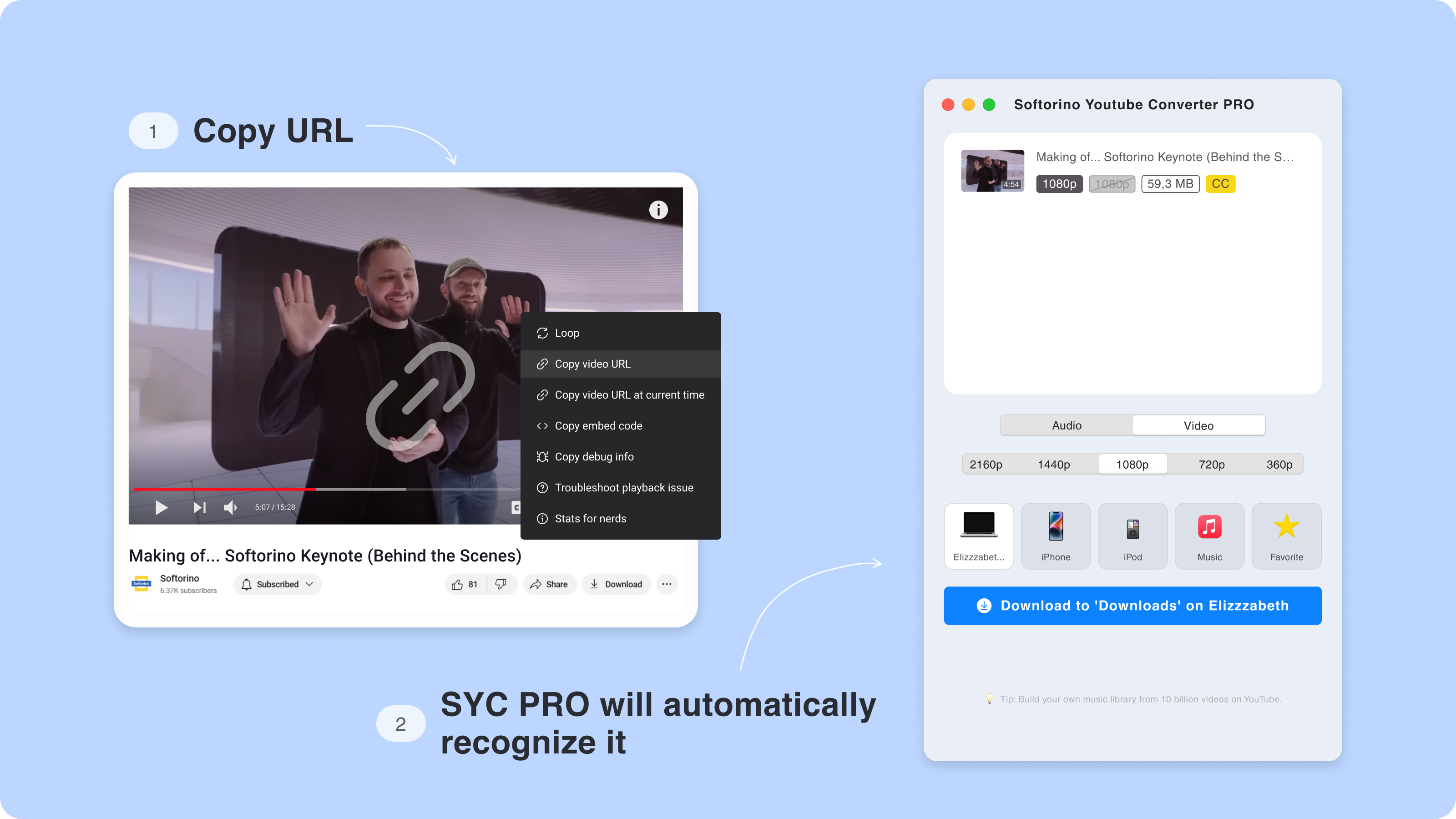
Paste the link into SYC PRO. The app adds the video to your download list. You can add more links before starting, which helps with playlists, courses, workouts, travel clips, and long interviews.
Step 3: Pick quality, format, and destination
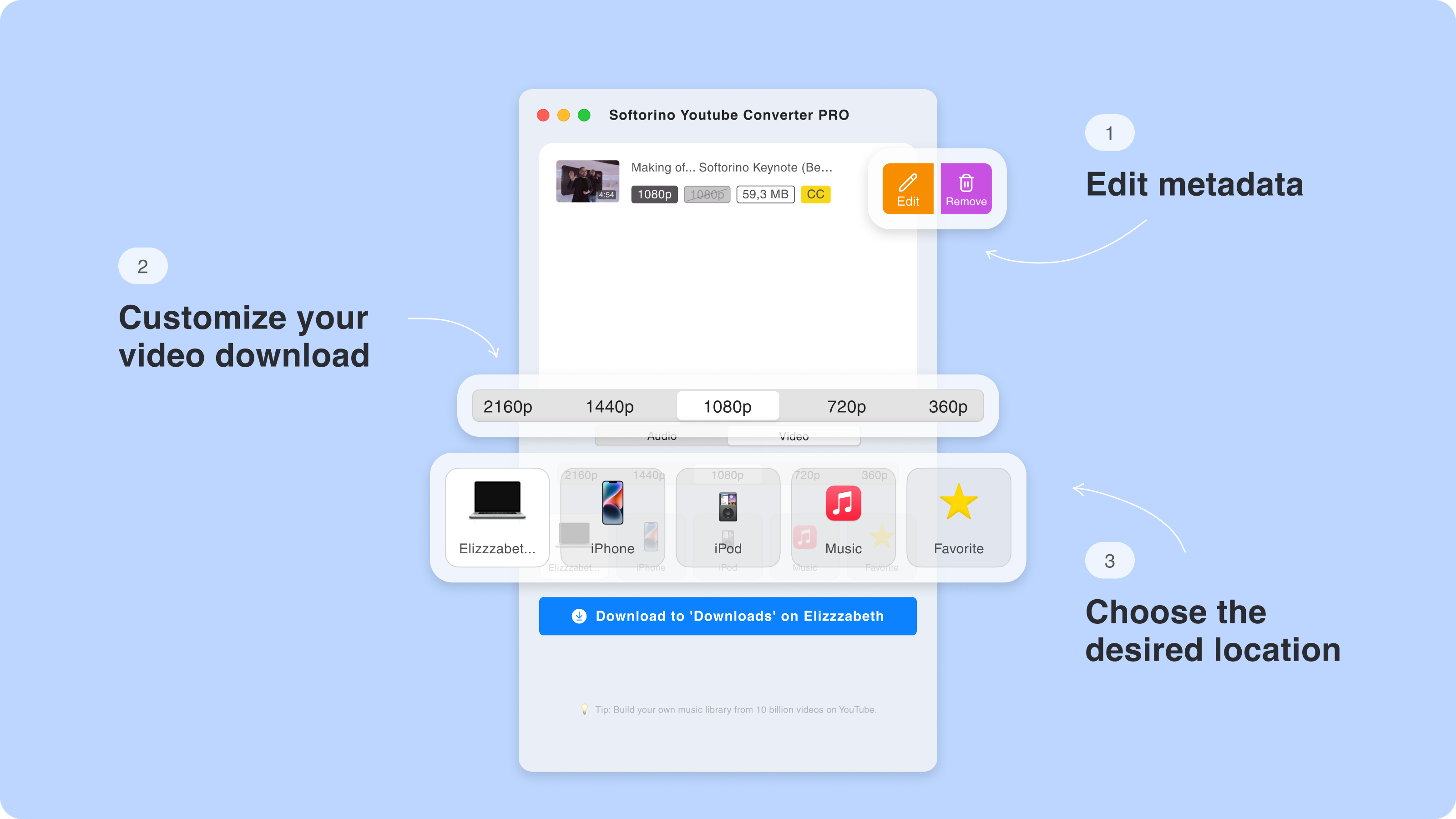
Choose the download quality. Pick 4K only when the source video supports it and your device has enough storage. Pick 1080p when you want a smaller file that still looks sharp on a phone.
Then choose the format. MP4 is the safest choice for video because it works across Apple devices, TVs, and most media players. MP3 or AAC is better when you only need the audio. Use the destination menu to save to your Mac, PC, iPhone, iPad, or Apple Music.
Step 4: Edit metadata before saving
A downloaded file named video_final_03 helps nobody. Before you save, edit the title, artist, genre, year, and artwork. SYC PRO can also fill metadata automatically, which matters when you send music to Apple Music.
Clean metadata makes your offline library usable. Songs show up with the right names. Videos stop looking like random files from a forgotten Downloads folder.
Step 5: Download and watch offline
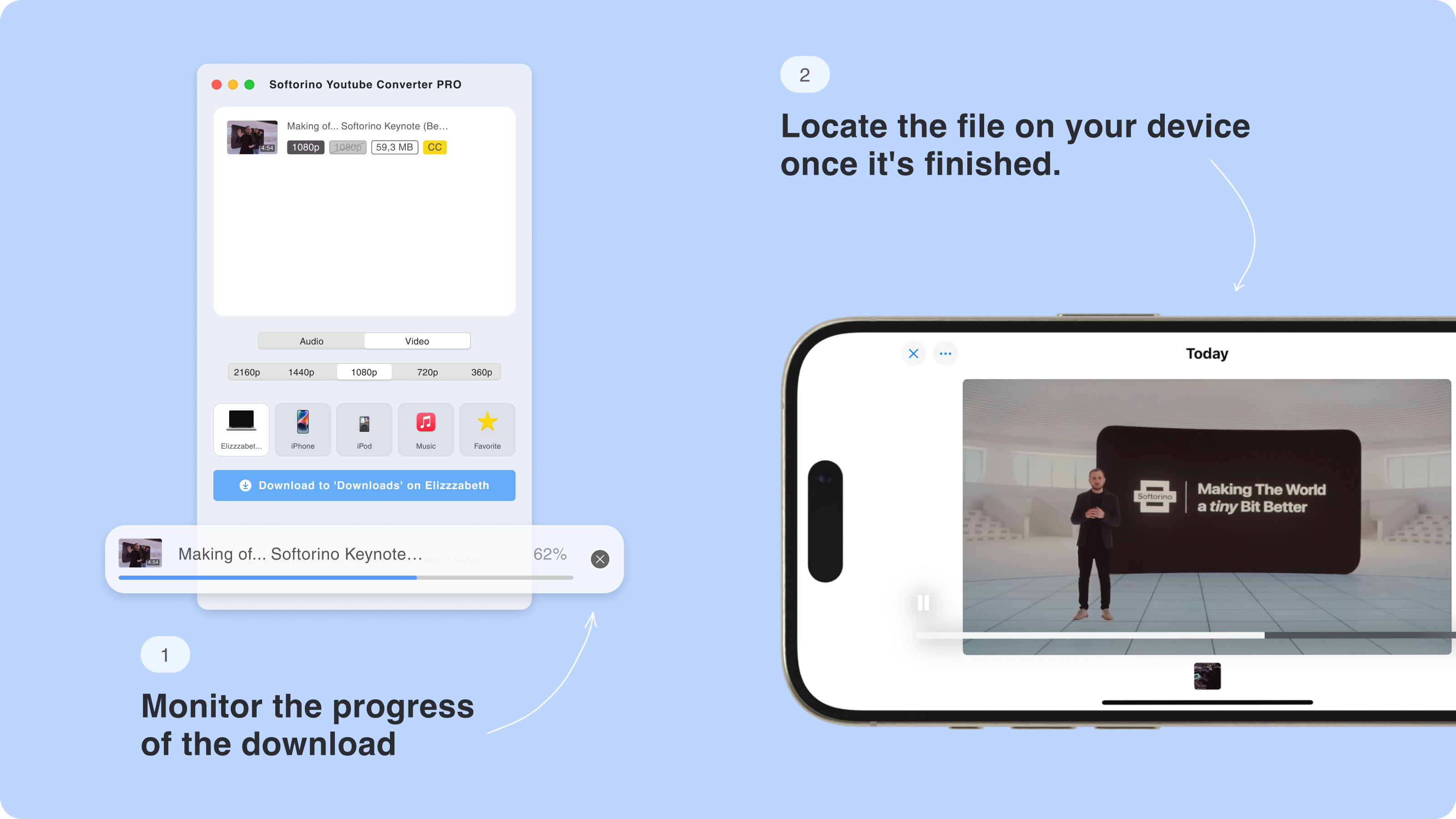
Click Download. SYC PRO saves the file in the format, quality, and destination you picked.
If you selected an Apple device, the video or audio lands where it belongs. Videos open in the native video player. Audio can go to Apple Music. No iTunes sync. No Finder dragging. No hoping Apple cooperates.
Why SYC PRO works as a 4K YouTube downloader for iPhone
SYC PRO is strongest when the destination matters more than the download folder. Generic 4K Video Downloader-style tools often stop after the file reaches your Mac or Windows PC. SYC PRO keeps going.
That is the cleaner path for iPhone users. You can save YouTube videos as MP4, send audio to Apple Music as MP3 or AAC, add metadata, and move the file to an Apple device without iTunes.
Use SYC PRO when you want:
- YouTube videos saved as MP4 for iPhone, iPad, Mac, Windows, or TV playback.
- YouTube audio saved as MP3 or AAC for Apple Music.
- Playlists, Shorts, subtitles, and 4K when the source supports them.
- Metadata editing before the file enters your library.
- A Mac and Windows workflow that avoids browser converter ads and fake buttons.
Use 4K Download, YTD Video Downloader, or another generic downloader when you only need a local file on your computer and do not care about iPhone transfer. That is a fair use case. It is just not the strongest Apple-device workflow.
4K YouTube downloader safety checklist for 2026
Search results for YTD and 4K downloaders are messy. Some pages are legitimate apps. Some are online tools. Some are mirror pages with extra buttons and outdated installers. Run this checklist before you install anything:
Download desktop software from the official vendor site, not a mirror.
Check whether the video really offers 2160p before blaming the downloader.
Avoid pages with fake Download buttons, notification prompts, and surprise extensions.
Read the current free-plan limits before assuming 4K, playlists, subtitles, or batch downloads are included.
Use YouTube Premium when you want the clean official offline route inside YouTube.
Do not judge a 4K YouTube downloader by the word “free” alone. Free tools may cap quality, batch downloads, playlists, speed, or ads. Paid tools may remove those limits, but exact limits change, so check the current vendor page before you install anything.
SYC PRO's angle is simple: use a desktop app when you need repeatable YouTube downloads, 4K or 2160p where available, and direct Apple-device transfer.
Key SYC PRO features that matter for 4K downloads
A good 4K YouTube downloader should not bury you in settings. It should make the common choices obvious: format, quality, destination, subtitles, playlists, and metadata.
Edit metadata while downloading from multiple platforms
SYC PRO lets you save media from YouTube, Vimeo, SoundCloud, and other supported sources. Before the file lands on your device, you can edit the title, artist, genre, year, and artwork.
This sounds small until your music library turns into 40 files called “YouTube audio.” Metadata keeps your offline library readable.

Download YouTube videos as MP4 in HD or 4K
MP4 is the practical format for most people. It plays on iPhone, iPad, Mac, Windows, TVs, and most video apps. If you want a 4K YouTube downloader for Apple devices, MP4 should be your default choice.
Choose 4K for big screens, editing, and long-term storage. Choose HD when you care more about storage and battery life.

Transfer YouTube audio to Apple Music
If you only need the soundtrack, podcast, lecture, or song, download audio instead of the full video. SYC PRO can send the audio to Apple Music so it behaves like part of your library.
This is cleaner than keeping random MP3 files in Downloads. It also means you can listen offline without reopening a browser tab.

Download YouTube videos with subtitles
Subtitles help with language learning, accessibility, lectures, interviews, and noisy commutes. SYC PRO can save videos with captions when the source video provides them.
Set expectations here. Human-made subtitles are usually cleaner than auto-generated captions. Some videos have no captions. Some have captions in only one language. The downloader can save what YouTube makes available, not create perfect subtitles from thin air.

Save YouTube VR videos for offline viewing
SYC PRO also supports YouTube VR downloads when the source video provides that format. VR files can be large, so check storage before building a whole offline collection.
Use this for travel, demos, learning material, or any VR content you already have the right to save.

Online 4K YouTube downloader vs desktop app
Online converters look tempting because they need no install. Paste a URL, click a button, and maybe you get a file. Maybe you also get 4 fake buttons, 3 pop-ups, a browser notification prompt, and a download that caps at 720p.
A desktop 4K YouTube downloader is the better choice when you need:
- Save 4K or high-bitrate video.
- Download long videos without a browser tab failing halfway.
- Queue playlists or several links.
- Save subtitles when the source provides them.
- Choose MP4, MP3, or AAC.
- Transfer directly to iPhone or iPad.
- Repeat the workflow without relearning a sketchy website.
Use online tools only for low-risk, low-quality, one-off jobs. For anything you care about, use a trusted desktop app from the official vendor site.
4K YouTube downloader alternatives, without the sales fog
SYC PRO is not the only option. It is the best Softorino fit for Apple-device transfer. Other tools can make sense depending on your tolerance for setup, ads, manual file moving, and platform rules.
Option | Best for | 4K path | iPhone path | Main tradeoff |
|---|---|---|---|---|
SYC PRO | iPhone, iPad, Apple Music, Mac, Windows | Saves 4K when the source supports it | Direct Apple-device destination without iTunes | Paid app after trial |
4K Download | Desktop archiving and power users | Strong desktop 4K/8K positioning | Usually requires manual transfer after download | More desktop-first than iPhone-first |
YouTube Premium | Official offline viewing | Quality depends on YouTube app support and availability | Inside YouTube app only | Files do not become normal MP4s |
Online converter | One-off low-risk clips | Often capped or inconsistent | Manual transfer needed | Ads, fake buttons, limits, and reliability issues |
yt-dlp | Technical users | Powerful when configured correctly | Manual transfer needed | Command-line workflow is not for most readers |
If you want the least drama, pick based on the destination. Desktop archive? A generic downloader can be fine. iPhone, iPad, Apple Music, or a clean Mac/Windows workflow? SYC PRO is the better match.
Extra use cases for a 4K YouTube downloader
A 4K YouTube downloader should cover more than one pasted URL. These are the cases where a desktop app usually beats a browser converter.
Download YouTube playlists in 4K
Playlists are where desktop apps beat browser converters. Add the playlist link, choose your format, and queue the downloads. This helps with tutorials, lectures, workouts, music sets, interviews, and travel prep.
Check storage before downloading a whole playlist in 4K. Ten long 2160p videos can fill a phone or laptop fast. If you plan to watch on iPhone, HD may be the smarter choice.
Download YouTube Shorts
Shorts are small, but people still save them for edits, reference, or offline viewing. SYC PRO can handle short-form video when the source URL is supported. Choose MP4 if you want to keep the video.
Download long YouTube videos
Long videos need more stable downloads than most converter sites can handle. A 2-hour 4K file can fail, time out, or eat storage fast. Use desktop software, check free space first, and consider HD instead of 4K if you only plan to watch on a phone.
Softorino also has a guide for how to download long YouTube videos if that is your main use case.
Build an offline travel library
Flights, trains, weak hotel Wi-Fi, and rural trips make streaming annoying. Download before you leave, then watch or listen offline. This is where direct iPhone and iPad transfer matters.
MP4, MKV, AAC, or MP3: which format should you choose?
Pick the format based on where the file will live. For most 4K YouTube downloader searches, MP4, MP3, and AAC cover the job.
MP4 is best for iPhone, iPad, Mac, Windows, TVs, and general video playback. MP3 is best for audio-only downloads, lectures, podcasts, and broad compatibility. AAC is useful for Apple Music and Apple-device audio workflows. MKV is useful for desktop archiving in some workflows, but it is less friendly for Apple devices.
Do not complicate it. Use MP4 when you want video. Use MP3 or AAC when you only want the sound.
Final verdict: the best 4K YouTube downloader depends on the destination
If you want a generic desktop downloader, you have options. If you want a 4K YouTube downloader that can save YouTube video or audio to iPhone, iPad, Apple Music, Mac, or Windows, SYC PRO is the practical pick.
The real win is not “4K” by itself. The win is saving the right file, in the right format, on the device where you want to watch or listen. That is where most downloaders make you do extra work.
Try Softorino YouTube Converter PRO if you want YouTube downloads without iTunes, browser-converter spam, or manual file juggling. If you use more than one Softorino app, you can also get all Softorino apps under one Universal License.
For content you own or have permission to save, Softorino YouTube Converter PRO can download online video or audio to a computer or iPhone.
FAQ
What is the best 4K YouTube downloader for iPhone?
SYC PRO is the best Softorino fit when you want a 4K YouTube downloader for iPhone. It lets you choose MP4, pick the available video quality, select iPhone or iPad as the destination, and avoid iTunes transfer steps.
Can a 4K YouTube downloader save true 4K quality?
Yes, if the original YouTube video has a 4K stream. Check whether YouTube offers 2160p for that video. If the source only has 1080p, the downloader cannot create real 4K detail.
Is YTD Video Downloader the same as a 4K YouTube downloader?
Not exactly. YTD Video Downloader is one downloader app/category. A 4K YouTube downloader should also handle source quality checks, MP4 output, subtitles, playlists, and the final destination for the file.
Is it legal to download YouTube videos?
It depends on the video, your rights, and platform rules. Download your own videos, permissioned content, copyright-free content, or use YouTube Premium for YouTube's official offline feature. Do not download copyrighted content without permission.
Can I download YouTube videos with subtitles?
Yes, when subtitles are available for the source video. Human-made captions usually work better than auto-generated captions. If a video has no captions, a downloader cannot save subtitles that do not exist.
Can I download YouTube playlists in 4K?
Yes, if the playlist videos support 4K and your device has enough storage. For long playlists, check disk space first. 4K files get large fast, so HD may be better for phone viewing.
What is the best format for YouTube downloads on iPhone?
Use MP4 for video and MP3 or AAC for audio. MP4 works well on iPhone and iPad. MP3 is better for broad audio compatibility. AAC is a good fit for Apple-device audio workflows.

SYC PRO
Download Web Videos Like a PRO
