Best Chromecast Apps for Mac: 4 Local Video Players

Best Chromecast apps for Mac: quick picks
Quick answer: Beamer 4 suits Mac users who want a dedicated drag-and-drop video sender, especially with an existing Softorino license. Airflow is the stronger starting point if you want a one-time purchase and detailed subtitle controls. VLC is the free option to try before paying. Elmedia Player adds casting to a full Mac media player. Choose by your receiver, subtitles and license needs, not by an app's claim to play every format.
Tool | Best for |
|---|---|
Beamer 4 | Dedicated Mac-to-TV playback, especially for Universal License users |
Airflow | One-time purchase with detailed subtitle and audio controls |
VLC | Free local-file casting before buying another app |
Before we begin
Download Beamer 4 to send a local video from your Mac to Chromecast without mirroring your desktop. Try your own file, audio track and subtitles before choosing a paid license. Beamer is a Mac app; it is not a way to unlock protected streaming-service downloads.
Why listen to us?
This guide is published under Josh Brown, CEO at Softorino. Vendor disclosure: Softorino makes Beamer 4. The comparison uses official product pages, support documents and store listings reviewed on October 24, 2026. No hands-on playback tests were performed for this guide. Recommendations reflect documented features and license terms, not measured speed or picture-quality scores.
Full comparison table
Tool | Main fit | Cast subtitle evidence | Free casting | Paid option | Main caution |
|---|---|---|---|---|---|
Beamer 4 | Dedicated Mac sender | Vendor lists embedded and external subtitles | Free trial; check current limits | Universal License subscription | Bundle cost matters if you only need casting |
Airflow | Focused sender with audio controls | Embedded, external and bitmap subtitle OCR | Playback limited to 20 minutes | One-time license | Receiver and source Mac still limit playback |
VLC | Free player with Cast output | Cast subtitle delivery not verified here | Free | No paid license required | Local subtitle support does not prove TV output |
Elmedia Player | Mac player plus Cast, AirPlay and DLNA | Vendor lists streaming with embedded/external subtitles | 5-minute limit in free App Store version | Paid app or PRO upgrade | Free playback is not unlimited free casting |
Prices and offers below were reviewed on October 24, 2026. Currency, taxes, promotions and purchase channel can change the amount you pay. A trial limit is not a measured performance limit.
How we evaluated
The review compares four apps that officially support sending local files to Chromecast. The criteria are receiver support, subtitle handling, playback controls, free casting limits and licensing. Official pages take priority over old roundups. No app was installed, no license was bought, and no movie was streamed as part of this review.
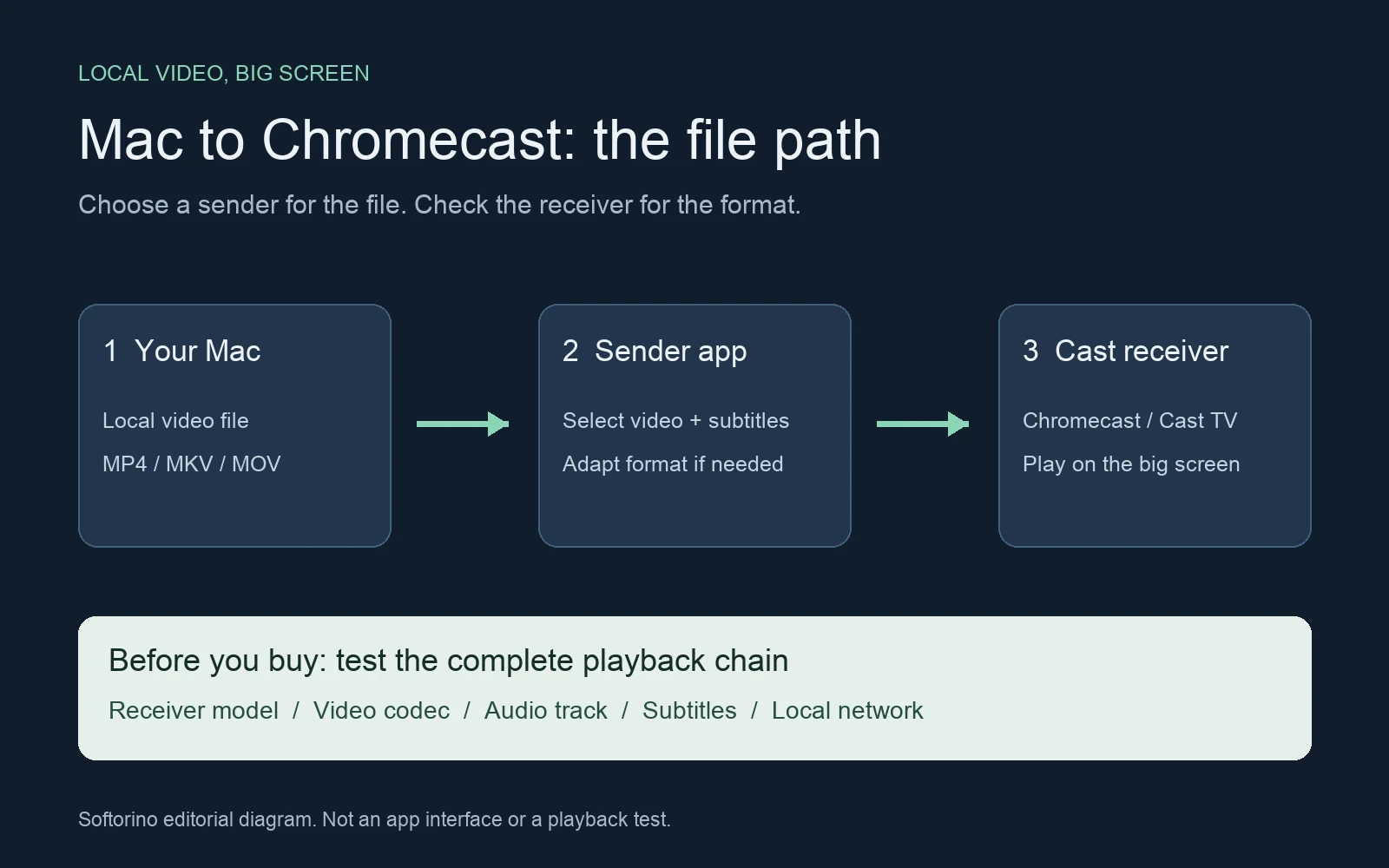
The useful test is your file on your TV. A video playing on the Mac does not prove its audio and subtitles will reach a Cast receiver. The diagram shows that chain; it is an editorial illustration, not an app screenshot.
Quick Takeaways
Start with VLC if price is the main constraint; it has real Chromecast output.
Compare Airflow and Beamer when subtitles and a dedicated sender matter more than a general player.
Consider Elmedia Player when you also want local playback and several receiver protocols.
Test the exact video, subtitle and audio tracks before paying for any app.
Beamer 4: dedicated Mac-to-TV playback
Beamer 4 is a good fit when you want to send a file, not manage a media library. Drag a local video into the app and choose the receiver. The Beamer product page lists Chromecast, Chromecast Ultra and other Google Cast devices, alongside Apple TV and AirPlay 2 support.
The attraction is the focused workflow. You do not need to build a server catalogue just to show a camera export or watch one authorized movie file. Beamer handles the streaming and any needed conversion. That does not mean every file travels untouched, or that the Mac can go to sleep during playback.
Beamer 4 key features
- Local video formats listed include MKV, AVI and MOV, with H.264 and HEVC support.
- Embedded and external subtitles, including text- and bitmap-based formats.
- Playlists and queues for several videos.
- Chromecast Ultra support with the vendor's stated 4K/HDR capability.
Beamer 4 pros
- A focused sender rather than a large media-server setup.
- Useful when a household has both Chromecast and Apple TV receivers.
- Included in Universal License if you already use other Softorino apps.
Beamer 4 cons
- Mac-only; this is not a Windows solution.
- A recurring app bundle can cost more than a standalone casting tool.
- The product page limits activation to one Mac at a time.
- Receiver, file and network limits still apply; try difficult subtitles and audio first.
Beamer 4 pricing
Beamer is free to download and try. Paid access uses the Universal License subscription. At review, that page displayed US$180 annually, with a US$0.99 first-day offer and wording of US$3.46 per week billed annually. The introductory amount is not the annual price. Confirm the renewal amount, taxes and cancellation terms before paying.
Who Beamer 4 is best for
Choose Beamer when you already have Universal License or want its dedicated Mac sender alongside the other included apps. If you only want one paid casting tool and dislike subscriptions, compare Airflow first. If occasional free casting works in VLC, there is no reason to buy a bundle just for this job.
Airflow: a focused one-time purchase
Airflow is the first paid alternative to consider for subtitle-heavy viewing. Its official documentation describes embedded and external subtitles, plus OCR that reads text from picture-based DVD, Blu-ray and VobSub subtitles. Those are vendor-documented capabilities, not results from a test of your subtitle files.
Airflow targets Chromecast, Apple TV and AirPlay 2 TVs. It aims to preserve the original video when compatible and transcode when necessary. For a buyer choosing a Chromecast app for Mac, the useful difference is the combination of focused casting, subtitle controls and a nonexpiring license.
Airflow key features
- Embedded and external subtitle handling, including bitmap-subtitle OCR.
- Audio/video sync adjustment and audio volume controls.
- Playlists, saved playback positions and a Chromecast speed test.
- 4K HDR HEVC streaming to supported receivers, with Chromecast Ultra explicitly named.
Airflow pros
- One-time payment rather than a subscription.
- One license covers computers you own, according to the vendor FAQ.
- A 20-minute playback trial gives you time to check a representative clip.
- Separate Mac and Windows downloads suit a mixed-computer household.
Airflow cons
- The free download is not unrestricted free viewing.
- OCR and format claims still need checking with your own files.
- Unsupported receiver formats can require transcoding on the source computer.
Airflow pricing
The official Airflow page showed €18.99 in the regional storefront during review. It states that the payment is one-time and the license does not expire. The US checkout price was not independently verified, so do not treat that euro amount as a dollar quote. Unlicensed playback is limited to 20 minutes. The Mac download requires macOS 10.12 or newer.
Who Airflow is best for
Choose Airflow if you want a dedicated casting app without recurring billing, especially when subtitle formats or audio timing matter. Its detailed controls make it a credible alternative to Beamer, not a lesser fallback. Run the trial with the tracks you actually watch before deciding.
VLC: free casting worth trying first
VLC can cast to Chromecast. This is documented by VideoLAN, even though some older comparisons describe VLC as a local-only player. The VLC release documentation explicitly lists Chromecast streaming, including formats the receiver does not support natively.
That makes VLC a sensible first attempt for an occasional video. Download the current Mac version from VideoLAN, then check whether your receiver and file work together. Avoid buying another player simply because a review assumes free software cannot send video to a TV.
VLC key features
- A free, open-source media player with Chromecast output.
- Broad local audio and video playback support.
- A playback path for formats not supported natively by the Cast receiver.
- Mac builds for supported Intel and Apple Silicon systems.
VLC pros
- No paid license or subscription is needed.
- You may already have it installed for local playback.
- A practical way to find out whether a paid app solves a real problem for you.
VLC cons
- This review did not verify subtitle delivery through VLC's Chromecast output.
- A subtitle appearing on the Mac is not proof it will appear on the TV.
- Format adaptation can depend on the file and receiver; broad local support is not a guarantee of identical Cast playback.
VLC pricing
VLC is free and open source. The official Mac download page provides the current version and system requirements. There is no premium casting tier to unlock. Download from VideoLAN rather than a third-party page offering a paid installer.
Who VLC is best for
Choose VLC when the price must be zero or you only cast occasionally. If the picture, audio, seeking and subtitles all work with your own file, keep it. If subtitles are essential and fail on the receiver, test a dedicated sender instead of assuming another local subtitle setting will fix the Cast output.
Elmedia Player: local player and TV sender
Elmedia Player fits readers who want one app for watching on the Mac and sending files to several TV types. The vendor documents Google Cast, AirPlay and DLNA support, plus streaming with embedded and external subtitles. That broader receiver mix is useful when not every screen in your home uses Chromecast.
The important buying distinction is the edition. Elmedia's free local playback does not mean unrestricted free TV streaming. Check the exact app listing or upgrade you are purchasing, because the free App Store app and the separate paid app are different purchase routes.
Elmedia Player key features
- Local video playback with subtitle and audio controls.
- Casting to Google Cast receivers, plus AirPlay and DLNA destinations.
- Streaming with embedded or external subtitles.
- Playlists and playback control from the Mac while streaming.
Elmedia Player pros
- Local viewing and TV playback in the same player.
- Several receiver protocols beyond Google Cast.
- A short free casting trial to check basic compatibility before upgrading.
Elmedia Player cons
- The free App Store version limits streaming to 5 minutes.
- Advanced features require a paid entitlement.
- Native playback, transcoding and 4K support depend on the destination and file.
Elmedia Player pricing
The US Mac App Store listed the separate paid app, Elmedia:universal video player, at US$19.99 upfront during review. That listing includes streaming features and requires macOS 10.13 or later. Do not assume its price applies to a direct-vendor license or the PRO upgrade inside the separate free app.
Who Elmedia Player is best for
Choose Elmedia when you want a full Mac media player that can also send files to different receiver families. If all you need is a dedicated Chromecast sender, compare Airflow's licensing and Beamer's bundle fit. If free VLC playback meets your needs, a larger feature list is not a reason to switch.
How to choose
Start with the constraint you cannot change: the TV receiver, the file or the budget. Then use these rules rather than a universal winner.
- If free is essential, try VLC. Keep it if the whole file plays correctly.
- If you want a paid sender without a subscription, start with Airflow's trial.
- If you already have Universal License, try Beamer before buying a second tool.
- If you need local playback plus Cast, AirPlay and DLNA, consider Elmedia Player.
- If a local file already plays and casts correctly in Chrome, you may not need another app.
Google's Chrome casting instructions explain how to open a local file in a tab and cast it. This is worth trying for a browser-playable file. It does not establish support for every MKV, audio track or subtitle format.
Check the receiver, file and subtitles
An MKV extension is not a codec specification. The container can hold different video, audio and subtitle tracks. A successful result depends on the complete chain, not just the app accepting the file. Google's Cast media documentation lists receiver-specific format limits.
A 4K television does not turn every Chromecast into a 4K receiver. Likewise, an app's local HEVC playback support does not establish untouched HEVC streaming to every Cast device. Apps may adapt a file while streaming, which adds work for the Mac.
Use a short, authorized sample with the same tracks as your full video. Follow this checklist before buying:
- Connect the Mac and receiver to the same local network.
- Confirm that the sender can find the intended receiver.
- Play a section with dialogue and check sound at the TV.
- Select the subtitle track you need and check timing and characters.
- Seek forward and resume, then leave playback running long enough to spot interruptions.
Keep the Mac awake and connected while it supplies the file. If your real goal is showing an app or presentation, read the casting versus mirroring guide instead. If the receiver is Apple TV rather than Chromecast, the MKV on Apple TV guide covers that separate path.
Try one local video with Beamer
For the documented Beamer workflow, open the Mac app, drag in your video and select the TV receiver. Use a file you own or have permission to play. Download Beamer's free trial, then check audio and subtitles before choosing a license. No app in this comparison should be treated as a DRM-removal tool.
FAQ
What is the best Chromecast app for Mac local videos?
The best choice depends on your budget and files. Beamer suits dedicated Mac-to-TV playback and existing Universal License users. Airflow offers a focused one-time purchase, VLC is free, and Elmedia combines local playback with several receiver protocols. Test the exact subtitles and audio you need before paying.
Can VLC on Mac cast to Chromecast for free?
Yes. VideoLAN documents Chromecast streaming in VLC, and VLC is free and open source. This does not mean every subtitle or audio track will reach every receiver correctly. Check the whole video on the TV rather than judging only its playback on the Mac.
Do I need an app if Chrome already plays my file?
Not necessarily. Google documents opening a local file in a Chrome tab and casting it to a supported receiver. If picture and sound work for your file, that may be enough. Consider a dedicated sender when you need better file, subtitle or playlist handling.
Will subtitles work when casting an MKV from Mac?
They can, but the subtitle format, sender and receiver all matter. Beamer, Airflow and Elmedia advertise embedded and external subtitle handling. Airflow also describes bitmap-subtitle OCR. VLC's Chromecast subtitle delivery was not verified for this review, so test it before relying on it for a film.
Can I close my Mac while a local video is casting?
Keep the Mac awake and connected while it supplies a local video. If closing the lid puts the Mac to sleep, playback can stop. A local-file sender is different from a supported streaming service where the receiver fetches the video independently.
Are these apps for Netflix downloads or protected movies?
No DRM bypass is described here. Use these apps for unprotected files you own or are authorized to play. A streaming service's offline download may work only inside that service's app. Follow its supported playback methods and terms instead of treating it as an ordinary video file.
Best Chromecast apps for Mac: bottom line
Try the free path first. Choose Airflow for a focused one-time license, Beamer for its dedicated workflow and Softorino bundle fit, or Elmedia for player-plus-receiver flexibility. The right app is the one that handles your file, audio and subtitles on your actual TV without making you pay for features you do not need.

Beamer
Stream Any Video File from Mac to Apple TV
