Best yt-dlp GUI Alternatives: 4 Desktop Apps Compared

yt-dlp GUI alternatives: quick answer
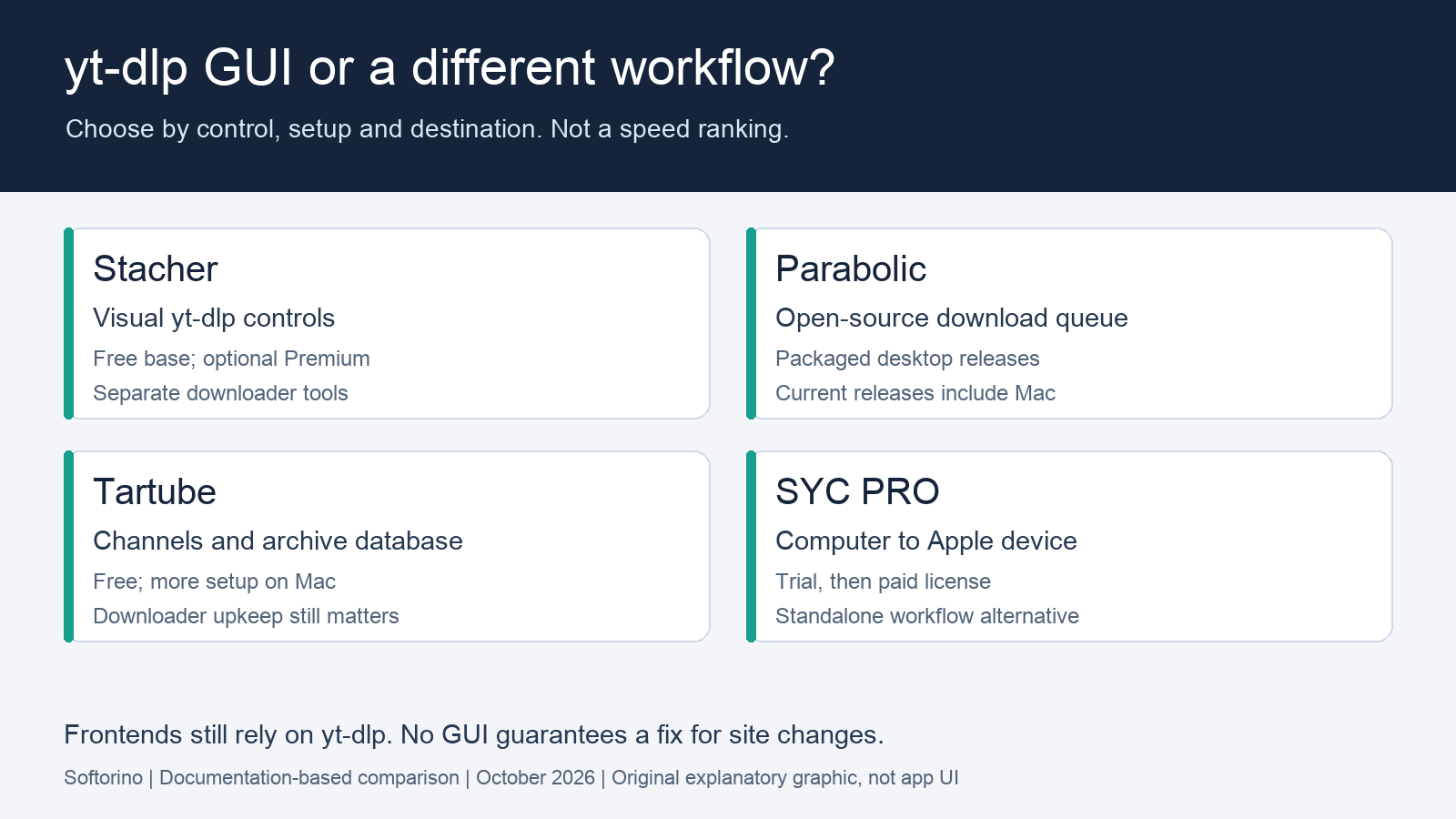
Quick answer: Choose Stacher for visual yt-dlp settings, Parabolic for a free open-source download queue, or SYC PRO when permitted files need to reach an Apple device from your computer. Tartube suits channel archives with more setup. Stacher, Parabolic and Tartube are yt-dlp frontends; SYC PRO is a separate workflow option. A frontend changes the interface, not the underlying downloader. A different window does not guarantee a fix for a broken site.
Tool | Best for |
|---|---|
Stacher | Visual yt-dlp settings and subscriptions |
Parabolic | Free open-source queue with format choices |
SYC PRO | Permitted files sent from computer to Apple device |
Before we begin
Want the file on your iPhone? Download Softorino YouTube Converter PRO (SYC PRO) on your computer to save authorized video or audio and send it to your Apple device. This guide covers the documented Mac workflow. SYC PRO is a standalone app alternative here, not a claimed yt-dlp frontend or an iPhone-only downloader.
Why listen to us?
This guide appears under Josh Brown, CEO of Softorino. Vendor disclosure: Softorino makes SYC PRO. Recommendations below distinguish that paid desktop workflow from free yt-dlp frontends rather than declaring our app the winner for everyone.
The comparison uses official product pages, project documentation and release notes reviewed on October 24, 2026. It is documentation-based; no hands-on app tests or download-speed benchmarks were performed. Platform packaging, update paths and stated limits matter more here than a feature-count contest.
Full comparison table
Tool | Relationship to yt-dlp | Desktop availability | Setup and maintenance | Best fit | License model |
|---|---|---|---|---|---|
Stacher | yt-dlp frontend | Windows, Mac; Debian-based Linux package | App helps install/manage separate yt-dlp and FFmpeg tools | Visual settings and subscriptions | Free base; optional paid Premium |
Parabolic | yt-dlp frontend | Linux, Windows, Mac in current releases | Packaged releases; Mac bundle includes downloader dependencies | Concurrent jobs and output choices | Free, open source |
Tartube | Frontend for yt-dlp and compatible downloaders | Windows, Linux, BSD; manual Mac setup | Downloader plus dependencies; update method depends on package | Channels, folders and archive database | Free, open source |
SYC PRO | Standalone workflow alternative; not presented as a frontend | Mac workflow reviewed; Windows also marketed | Desktop app; choose format and computer/device destination | Download-to-Apple-device workflow | Free trial; paid license required afterward |
How we evaluated
The criteria: Can you install it on your computer, choose the output without command syntax, and keep the required downloader working? The comparison also checks queue/archive scope, license terms and where files go after downloading.
Official documentation was reviewed on October 24, 2026. A packaged app and a source-code build are not the same installation path. A free base app and its paid library features are not the same offer. Prices below describe published offers, not a checkout quote for every country.
For a broader comparison of file downloaders and official offline viewing, see our YouTube downloader guide. This page focuses on the narrower decision: keep yt-dlp behind a graphical interface, or choose a different desktop workflow.
Quick Takeaways
Stacher, Parabolic and Tartube are actual frontends; their download behavior still depends on the underlying tools.
Current Parabolic releases include Mac bundles. Older Windows/Linux-only comparison tables can be outdated.
Tartube can run on Mac, but its documented installation is not one click.
SYC PRO fits Apple-device delivery; choose a frontend if retaining yt-dlp controls is the priority.
Use only owned or authorized media, within the service's permitted download options and terms.
What a yt-dlp GUI changes
A yt-dlp GUI puts buttons, menus and a queue around the command-line downloader. You choose a format or destination visually instead of entering arguments in a terminal. That can remove everyday command syntax without removing the downloader's dependencies.
Frontend does not mean replacement engine. If yt-dlp needs an update for a site change, switching between two wrappers may not solve the problem. Their bundled versions, settings and update paths can differ, so neither identical success nor identical failure is guaranteed.
FFmpeg handles tasks such as merging separate audio and video streams or converting formats. Current yt-dlp documentation also lists JavaScript support requirements for full YouTube functionality. Prefer the app's supported dependency setup over instructions copied from an old forum post.
A standalone desktop app is a different buyer choice: it offers its own workflow rather than asking you to manage yt-dlp options. That label does not establish which code powers the app. This guide makes no claim that SYC PRO uses a separate extraction engine or cures a particular yt-dlp error. Source: yt-dlp documentation.
Stacher
Best fit: visual yt-dlp control. Stacher suits people who want familiar settings and repeat downloads without memorizing flags. Its official site describes a desktop GUI for Windows, Mac and Debian-based Linux distributions.
Stacher key features
- Visual settings and saved yt-dlp configurations.
- Subscriptions and video trimming described on the official site.
- Automatic yt-dlp update facility and an FFmpeg installation tool.
- Optional Premium Library, themes and custom-player features.
Stacher pros
- Keeps yt-dlp configuration accessible through a graphical interface.
- Offers Mac downloads for Intel and Apple silicon, plus Windows and a Linux DEB package.
- Separates the free downloading interface from optional paid features.
Stacher cons
- yt-dlp and FFmpeg remain third-party tools. Stacher says it does not host or distribute them; it offers installation and management from official sources.
- A new GUI does not guarantee recovery from blocked downloads or site changes.
- Library and custom-player features belong to Premium, not a blanket free-feature promise.
Stacher pricing
The official site describes the base yt-dlp GUI as free, with optional Stacher Premium. A current fixed Premium price was not verified on the checked public pages. Check its linked Patreon offer before subscribing. Conflicting trial descriptions also make a universal trial-duration claim unsafe.
Who Stacher is best for
Choose Stacher if your goal is to keep yt-dlp's settings but stop typing commands. It is a sensible first shortlist choice for that specific job, not a measured speed winner. Choose Tartube instead if a channel database matters more than a simpler daily download interface.
Sources: Stacher's official site and Premium information. The official download page is the right place to check current installers and checksums; a similarly named mirror is not equivalent evidence.
Parabolic
Best fit: a free open-source queue. Parabolic is a yt-dlp frontend with concurrent downloads, output choices, metadata and subtitles. It suits readers who want those controls in a packaged application rather than building a command themselves.
Parabolic key features
- MP4, WebM, MP3, Opus, FLAC and WAV output options.
- Multiple downloads at the same time.
- Metadata and video-subtitle support.
- Linux Flatpak, Windows packages and Mac bundles in current official releases.
Parabolic pros
- Free, open-source project with an MIT license.
- Current Mac releases cover both Intel and Apple silicon.
- The documented Mac bundle includes yt-dlp, Deno, FFmpeg and other dependencies.
Parabolic cons
- Output-format choice does not improve the original source quality. Converting compressed audio to FLAC does not restore lost detail.
- Site support still depends on yt-dlp, the app's version and its configuration.
- The project's 2026.4.0 notes warn that credentials in the Windows portable edition's app.db are stored in plaintext. Do not treat a portable folder as a secure password vault.
Parabolic pricing
Parabolic is distributed as a free, open-source project. No paid application tier was found in the official pages reviewed for this comparison. Use the project's release links rather than paying an unrelated download site for access to an installer.
Who Parabolic is best for
Choose Parabolic for a visual queue, common audio/video formats and an open-source license. Mac users should inspect current releases rather than reject it based on an older comparison: the project introduced a Mac bundle in its 2026.4.0 release.
The README also lists dependencies for developers building from source. Those are not automatically prerequisites for someone using a packaged release. Start with the installation instructions for your exact operating system and processor.
Sources: Parabolic documentation and official release notes.
Tartube
Best fit: channel and archive management. Tartube adds a database, folders and channel-checking tools around yt-dlp or another compatible downloader. Choose it when the collection matters as much as the next file.
Tartube key features
- Channel and playlist checks with an archive/database view.
- Folders and duplicate-avoidance tools.
- Classic Mode for direct URL downloads.
- Audio-only copies and livestream notifications described in the documentation.
Tartube pros
- Free, open-source software under the project's LGPL v2.1 license.
- Gives repeat collection work a visible structure instead of requiring custom shell scripts.
- Documents Windows, Linux, BSD and Mac installation paths.
Tartube cons
- Mac installation is explicitly not one click. The documented setup uses Python, GTK and additional packages.
- Some package variants disable in-app downloader updates; maintenance depends on how it was installed.
- A backup of the database is not a backup of the actual media files.
Tartube pricing
Tartube is free and open source. The trade-off is setup and maintenance time, not a quoted subscription price. Windows installers and Linux packages reduce some installation work; the Mac path remains more involved.
Who Tartube is best for
Choose Tartube if you track channels, organize folders or manage a growing archive of permitted media. Its added structure has a purpose for that reader. For an occasional URL on a Mac, start with a packaged option such as Stacher or Parabolic instead.
The official quick start may require selecting or installing a downloader and FFmpeg. Its Mac documentation also covers Deno for current YouTube use. Follow the current project instructions rather than assuming every operating system receives the same bundled components.
Source: Tartube documentation. The project documentation also explains the difference between database maintenance and preserving your downloaded files.
SYC PRO
Best fit: the destination is an Apple device. SYC PRO is worth considering when your real task is “put this permitted file in my iPhone's media apps.” It is a standalone desktop workflow alternative in this comparison, not a promised way to expose yt-dlp flags.
SYC PRO key features
- Video or audio downloads with format and destination selection.
- MP4, MP3 and AAC options described on the product page.
- Playlist, subtitle and editable-metadata features.
- Computer-to-Apple-device delivery in the documented workflow.
SYC PRO pros
- Combines downloading and Apple-device delivery rather than ending with a file in a desktop folder.
- Provides a graphical format/destination flow for readers who do not need command-line configuration.
- Offers a free trial so you can check your permitted source and intended destination before paying.
SYC PRO cons
- Requires a computer. Downloading to an iPhone is not the same as running an iPhone app.
- Continued use requires a paid license; the free open-source frontends above are better fits for a no-license-cost requirement.
- Not presented as a yt-dlp frontend. Do not assume existing command flags or configuration files transfer into it.
SYC PRO pricing
The Universal License page advertised “$0.99 First day” and “$3.46 per week billed annually” on October 24, 2026. That is promotional wording, not a verified checkout total or weekly billing. The page says Universal License is required and renews automatically. Check the actual initial charge, currency, taxes and renewal amount before paying.
SYC PRO's product FAQ contains an older, conflicting $39.96 license figure. Do not use that as the current checkout price. The trial and the paid subscription are separate offers; downloading the trial does not make the full app permanently free.
Who SYC PRO is best for
Choose SYC PRO if Apple-device delivery is the reason you are leaving the terminal. Choose Stacher or Parabolic if you mainly want yt-dlp through buttons. Choose Tartube if archive management is the priority.
The current product page markets both Mac and Windows, while an older FAQ still says Mac-only. This guide's concrete device workflow follows its Mac instructions; it does not claim identical features or minimum OS requirements for both editions. Check the current installer for your computer.
Source: SYC PRO product documentation. For the broader destination question, see downloading YouTube videos to iPhone.
How to choose
- If you want yt-dlp settings without command syntax, shortlist Stacher.
- If you want a free open-source queue with packaged Mac, Windows and Linux options, shortlist Parabolic.
- If you want channels, folders and an archive database, consider Tartube and allow time for setup.
- If you want permitted files delivered to an Apple device from a computer, try SYC PRO.
- If you already depend on exact scripts, flags or automation, keeping the yt-dlp command line may be the better decision.
Before committing, choose one authorized source and write down the required result: format, subtitle language, output folder and playback device. A successful download is not enough if the file cannot play where you need it. Do not buy a license solely because a comparison page lists your preferred format.
Check updates, permissions and private data
Update the right component. An app update, a yt-dlp update and an FFmpeg update are different things. Follow the frontend's instructions so you do not replace a managed dependency with an incompatible copy. If an authorized source still fails, keep the error log and consult the project's current issue tracker.
Avoid sharing logs or screenshots that expose cookies, access tokens, private URLs or account details. Cookie import is not permission to access someone else's media. No tool in this list grants a right to download, redistribute or bypass restrictions.
YouTube's terms restrict downloads unless authorized by the service or the required permissions. Use official offline viewing when that meets your needs. Do not bypass DRM, paywalls or access controls. Read YouTube's terms.
Want permitted files on your Apple device?
For the documented Mac workflow, download SYC PRO and start with one item you are authorized to save, where the service permits downloads. The product page describes this sequence:
- Open the desktop app and copy the authorized media URL.
- Connect your Apple device and choose the format, quality and destination.
- Download the file, then check it in the destination's Music or TV app as appropriate.
That sequence comes from documentation; no device was used for this review. If your goal ends at a desktop file, the free frontends may already cover it without a paid Apple-device workflow.
FAQ
Which yt-dlp GUI should I try first?
Stacher is a useful first shortlist choice for visual settings; Parabolic fits a free open-source queue with common output formats. Choose according to your operating system and update needs. Neither is a measured universal winner, and both depend on yt-dlp for downloading.
Will a different GUI fix a yt-dlp download error?
Not necessarily. A frontend still depends on its downloader, version, dependencies and the source site. Check the supported update path and the actual error before switching apps. A new interface is not evidence that restrictions or extractor failures will disappear.
Can I use a yt-dlp GUI on a Mac?
Yes. Stacher offers Mac installers, and current Parabolic releases include Intel and Apple-silicon Mac bundles. Tartube also documents Mac support, but requires manual setup. Check the current release instructions for your machine rather than treating every Mac option as equally easy to install.
Is SYC PRO a yt-dlp frontend?
This comparison does not classify SYC PRO as a yt-dlp frontend. It is a standalone desktop alternative for downloading permitted media and sending files to Apple devices. Its product page does not substantiate importing yt-dlp commands or using it as a graphical wrapper.
Which options are free?
Parabolic and Tartube are free, open-source projects. Stacher has a free base GUI with optional paid Premium features. SYC PRO offers a trial, then requires a paid license. Free software does not remove copyright obligations or the source service's download restrictions.
Bottom line
Keep the decision narrow. Stacher and Parabolic suit a graphical route into yt-dlp; Tartube adds archive structure at the cost of setup. SYC PRO fits permitted file delivery to Apple devices. Choose the workflow and maintenance burden you actually need, not an unsupported promise that another app will download everything.

SYC PRO
Download Web Videos Like a PRO
