Best Plex Alternatives for Apple TV: 4 Options Compared

Plex alternatives for Apple TV: quick shortlist
Quick answer: Infuse is the first Plex alternative to consider for Apple TV if you want a different player, with your existing server or a shared Mac folder. Choose Jellyfin when you want to replace Plex's server with free software. Choose Beamer when you only need to send a local Mac video to the TV. Emby is another full-server option with optional paid features. The right choice depends on where your files live and whether you need a server at all.
Tool | Best for |
|---|---|
Infuse | Playing a Mac's shared folders on Apple TV |
Jellyfin | Replacing a Plex server with free software |
Beamer | Sending selected Mac videos to Apple TV or Chromecast |
Before we begin
Only need to put a Mac video on the TV? Download Beamer to stream local files to Apple TV or Chromecast. It handles conversion during playback, so you do not need to prepare a separate MP4 first. Choose a media server instead if shared libraries and server-side organization are essential.
Why listen to us?
This comparison is published under Josh Brown, Softorino's CEO. Vendor disclosure: Softorino makes Beamer. Official documentation and US pricing sources were reviewed on October 26, 2026. No hands-on playback tests were performed for this article. Recommendations describe documented fit, not measured speed, picture quality or reliability rankings. Here, Apple TV means the box connected to your television, not the streaming subscription.
Full comparison table
Tool | Role and file source | Apple TV setup | Away from home | Subtitle caveat | Price model |
|---|---|---|---|---|---|
Infuse | Player; files on Mac share, NAS or server | Install Infuse; connect source | Configured remote source or VPN | Delivery path matters; see below | Free download; optional Pro |
Jellyfin | Server; files on Mac or another host | Swiftfin beta or compatible client | Configure secure server access | Client may require burn-in | Free server; client costs vary |
Beamer | Sender; selected files on Mac | Select nearby receiver from Mac | Not a remote library service | Test file and receiver together | Trial; paid Universal License |
Emby | Server; files on Mac or another host | Install Emby app; connect server | Configure server and network | Some tracks need transcoding | Free core; optional Premiere |
How we evaluated
We compared the role each app replaces, source-file location, Apple TV setup, remote access, subtitles and licensing. Sources include official product pages, setup guides, feature matrices and US App Store listings, checked October 26, 2026. Prices can change; taxes and local storefront prices may differ.
The shortlist deliberately includes different ways to replace a Plex workflow. Jellyfin and Emby replace the server. Infuse replaces the player and can use ordinary file sharing. Beamer replaces the need for a server when all you want is selected-file TV playback. None is a universal replacement for every Plex feature.
Quick Takeaways
Keep a server if you need one central library available to several clients.
Use an Apple TV player with a Mac share if you want folder-based playback without a separate media-server app.
Choose direct casting for selected files, not as a substitute for a shared library.
Check the exact TV app, macOS version and free-playback entitlement before paying.
Jellyfin: best for a free Plex server replacement
Jellyfin is the server option to start with when avoiding a premium license matters. It hosts your own media and serves it to separate playback clients. There is an official Mac installation path, so you do not need to switch to Linux merely to consider it.
The tradeoff is responsibility. You still select media folders, keep the server reachable, choose clients and handle network access. Switching to Jellyfin removes the premium server license; it does not remove server administration.
Jellyfin key features
- A personal-media server with client apps for playback.
- An official macOS installer and documentation.
- VideoToolbox hardware-acceleration support on compatible Macs.
- No paid premium-feature tier for the server.
Jellyfin pros
- Clear free-software model without a server subscription.
- Appropriate when you want to retain the server-and-library arrangement rather than abandon it.
- A choice of clients instead of a single mandatory player.
Jellyfin cons
- The server and its files must remain accessible during streaming.
- Hardware transcoding depends on the Mac, operating system and configuration. Do not assume every older Mac supports the same acceleration.
- Jellyfin lists Swiftfin as an official beta Apple TV client. Its current US listing requires tvOS 26.1 or later; check your installed OS before choosing it.
On Apple TV: install a compatible client and connect it to your Jellyfin server. Swiftfin is free; Infuse is another option with its own paid features. Check the Jellyfin client list and Swiftfin requirements rather than assuming the Mac server includes a TV player.
Subtitles and remote access: Jellyfin may remux subtitles or burn them into video, which requires transcoding. Results depend on the client and file. Away-from-home access needs deliberate network setup; Jellyfin recommends a VPN or a properly configured reverse proxy rather than direct port exposure. See its codec guidance and networking guide.
Jellyfin pricing
Jellyfin Server is free, with no premium license. A third-party client can have its own paid tier. For example, choosing Infuse Pro to play a Jellyfin library does not make Jellyfin itself a paid server.
Official sources: Jellyfin documentation, macOS installation and Apple hardware acceleration.
Who Jellyfin is best for
Choose Jellyfin if you want a Plex server replacement on Mac and are willing to manage it. Pair the server with an Apple TV client that supports your installed tvOS version. It is a stronger fit than Beamer for a central library; for one video on a nearby TV, it can be unnecessary work.
Infuse: best for Mac folders on Apple TV
Infuse is a player, not a media server. That distinction is useful if Plex feels like more infrastructure than your household needs. Infuse on Apple TV can read a shared folder on your Mac over SMB. You do not need to install a separate Plex, Jellyfin or Emby server for that arrangement.
Your Mac still supplies the files. The shared folder must remain available and the account needs access to it. Infuse does not make a sleeping or disconnected source Mac magically available.
Infuse key features
- Apple TV and Mac playback apps.
- Connections to Mac, PC and NAS shares, including SMB.
- Connections to existing Plex, Jellyfin and Emby servers.
- Additional playback and library capabilities through Infuse Pro.
Infuse pros
- Lets an Apple TV browse accessible Mac folders without a separate media-server application.
- Can also serve as a new player while you keep an existing server.
- Offers monthly, annual and lifetime Pro purchase options.
Infuse cons
- Does not replace the server side of a multi-client media system.
- The free download does not include every supported format or premium playback feature.
- The current US App Store listing requires tvOS 18.5 or later. Check requirements before choosing it for older hardware.
Subtitles: Firecore documents embedded subtitles, matching external files and subtitle downloads. External files should sit with the video on the share. Local subtitles do not work over UPnP/DLNA, and AirPlay or Google Cast output carries only text-based subtitles. These limits differ from playing directly in the Apple TV app. See Infuse subtitle guidance.
Away from home: Infuse can reach a properly configured remote source, but a local SMB share does not become remotely accessible just because Infuse can see it at home. Firecore documents remote connections and VPN use. Follow its away-from-home guide; do not expose a Mac's SMB port to the public internet.
Infuse pricing
Infuse is free to download. The US prices displayed for Pro on October 26, 2026 were USD $1.99 per month, $16.99 per year, or $99.99 for a lifetime purchase. Firecore advertises a seven-day Pro trial. Pro adds formats and features; do not assume a particular file's full playback is free.
Official sources: Infuse features and pricing and streaming from a Mac, PC or NAS.
Who Infuse is best for
Choose Infuse if your destination is Apple TV and a shared Mac folder covers your needs. Keep Plex connected if the player, rather than the server, is your problem. Choose Jellyfin or Emby when you need to replace the server itself.
Beamer: best for selected Mac-to-TV videos
Beamer fits the file-on-your-Mac, movie-on-your-TV job. Drag a local video into the Mac app and select an Apple TV or Chromecast. Beamer handles the conversion and streaming work rather than asking you to export a compatible file first.
That is narrower than Plex. Beamer is not the recommendation for running a shared household library, replacing Plex's server administration or building remote access. Its value is avoiding that setup when you do not need it.
Beamer key features
- Mac-to-Apple-TV and Mac-to-Chromecast video streaming.
- Support for formats including MKV, AVI and MOV.
- Conversion handled during the streaming workflow.
- Embedded and external subtitles, including text and bitmap formats, according to the vendor.
- Playback control from the TV remote on supported setups. This is not away-from-home network access.
Beamer pros
- Directly addresses selected-file playback without a separate library-server workflow.
- Avoids a manual conversion step just to watch a local file.
- Keeps the task focused on the source Mac and destination TV.
Beamer cons
- The sender app is for macOS, not Windows.
- It does not replace Plex's full server-and-library role.
- The Mac must stay available while serving the video, and receiver compatibility still matters.
Beamer pricing
Beamer is free to download and try; continued unrestricted use needs a paid license. On October 26, 2026, Softorino displayed a Universal License bundle offer of USD $0.99 for the first day, followed by $3.46 per week billed annually. That weekly figure describes an annual billing offer, not a weekly payment plan.
A current standalone Beamer purchase was not verified: the product FAQ and bundle terms conflict about individual licenses. Check the current Beamer offer and Universal License terms for the full renewal amount and cancellation rules before paying. Do not mistake the introductory price for the continuing cost.
Who Beamer is best for
Choose Beamer if selected local Mac videos and an Apple TV or Chromecast are the whole job. Choose Infuse if you prefer browsing a Mac share from Apple TV. Choose Jellyfin or Emby if the shared library is the reason you used Plex.
Start a Beamer playback check
- Download Beamer from its official page, open the DMG and move the app to Applications.
- Open Beamer and make the source Mac and supported receiver available on the same local network.
- Drag in a local video you own or are authorized to stream, then select the receiver.
- Check the actual file's subtitles, audio track and playback before buying a license for your setup.
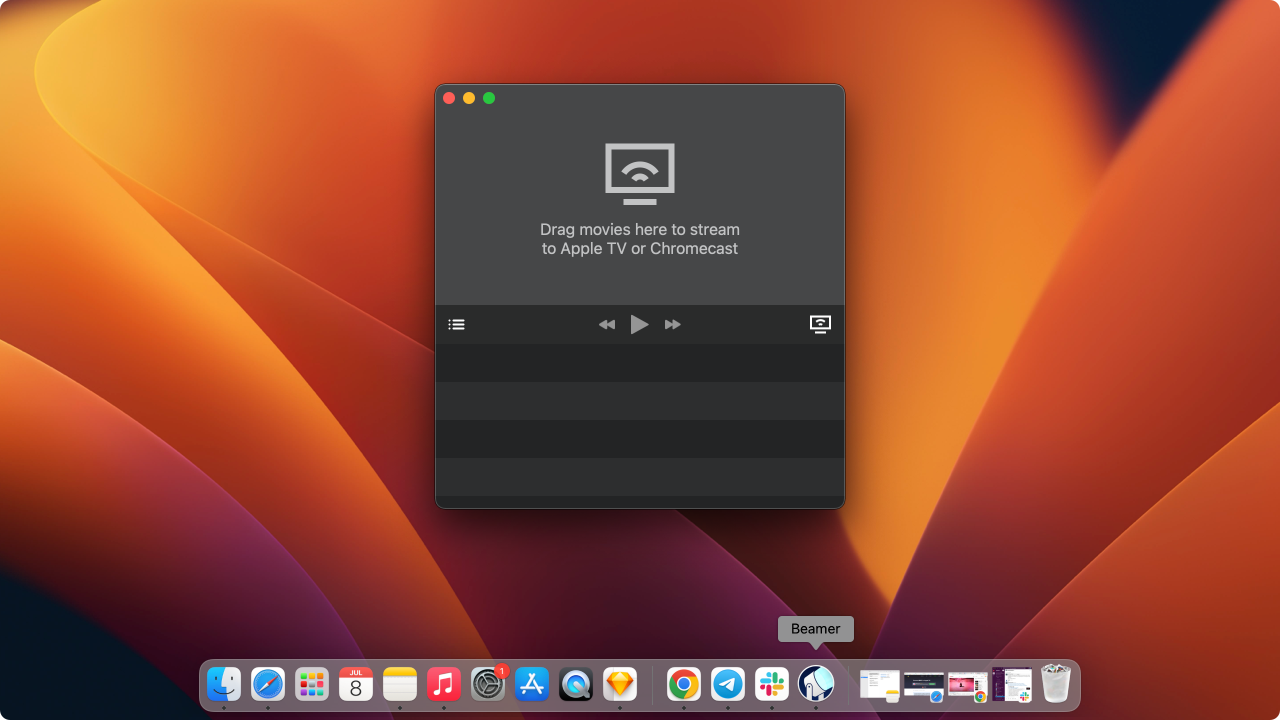
This existing Softorino screenshot shows Beamer's empty movie drop area and receiver control. It illustrates the workflow, not a new playback test or proof of a particular current version.
For format-specific instructions, see how to play MKV on Apple TV. For the difference between sending a video and exposing your desktop, see casting versus mirroring.
Emby: best for a server with optional paid features
Emby is a server-and-client replacement, not merely another video player. Install Emby Server on your Mac, organize your media and connect a compatible client. Emby's official downloads include a Mac server and an Apple TV app.
The important purchasing question is which clients and features you need. Emby's free and paid rights are not identical across devices. Its feature matrix is more useful than a blanket statement that Emby is either free or paid.
Emby key features
- A personal-media server with library organization and user management.
- A macOS server installation option.
- Separate Apple TV and other playback clients.
- Optional Premiere features including DVR and hardware-accelerated transcoding.
Emby pros
- Preserves the server-and-library model for people replacing Plex rather than abandoning a server.
- Free core functionality lets you evaluate the arrangement before buying Premiere.
- Premiere offers recurring and lifetime options.
Emby cons
- Still requires a server, accessible media and compatible clients.
- Some capabilities require Premiere; check the feature matrix against your own devices.
- The standard Premiere license is for one household and has a 30-device limit for Premiere features. That is not a promise of 30 simultaneous streams.
Emby pricing
Emby has a free core and an optional Premiere license. On October 26, 2026, the official standard Premiere prices were USD $4.99 per month, $54 per year, or $119 lifetime. Hardware-accelerated server transcoding is a Premiere feature for the Mac route discussed here.
The current matrix lists full browser and Apple TV playback in the free tier. The Mac desktop client's free playback is limited to one minute; full playback there requires Premiere. Live TV and in-playback subtitle search also require Premiere. Basic subtitle playback and subtitle search are separate features.
On Apple TV: the official guide covers Apple TV 4th generation and later. It lists SRT, SSA, ASS, SUB and VTT subtitles for direct play; other tracks may need server transcoding. Follow the Emby Apple TV guide and test your file rather than assuming all subtitle styles survive unchanged.
Remote access: you can connect to a remote Emby server, but its network must permit a secure connection. Emby Connect helps locate and sign in to the server; it does not remove the hosting setup. Use the server network guide before relying on access outside home.
Official sources: Emby downloads, Premiere pricing and the Premiere feature matrix.
Who Emby is best for
Choose Emby if you want an organized server library and its supported clients fit your household. Compare the exact Premiere features with Jellyfin's free server before deciding. For a single file on a nearby TV, Beamer is the more narrowly focused option.
How to choose
If you need a central media server, start with Jellyfin or Emby. Compare your TV clients and hardware-transcoding needs before choosing the license model. Neither product eliminates the need to keep the source machine reachable.
If you only dislike the Plex player on Apple TV, consider Infuse without replacing the server. If you want to remove the server application too, check whether a Mac SMB share is enough. Those are two different Infuse arrangements.
If you only want to send a selected local Mac video to Apple TV or Chromecast, try Beamer's workflow. Do not choose it expecting a Plex-compatible server, library migration or remote household sharing.
If your actual goal is taking files away from home on an iPhone or iPad, this is a different decision. Our Air Video HD alternatives guide distinguishes offline file transfer from ongoing streaming.
Compatibility and media rights
Check the destination before the price. A Mac server alone does not guarantee that your particular TV has a suitable client. Apple TV, Chromecast and a TV's built-in operating system are different destinations. Check the vendor's current requirements and test your own authorized sample file.
Only stream media you own or have permission to use. These recommendations are not instructions for bypassing DRM or obtaining unauthorized films. Container support, such as MKV, also does not guarantee every codec, subtitle type or audio track inside that file will play identically.
For shared folders, grant access only to the media you intend to share. For access outside your home, follow the selected server's current network and security guidance. Local playback instructions are not a safe remote-access configuration.
Want one Mac video on the TV?
Download Beamer for Mac if you want to try selected-file playback on Apple TV or Chromecast. If you need the library server too, start with Jellyfin or Emby instead.
Frequently asked questions
What is the best Plex alternative for Apple TV?
Infuse is a strong starting point if you want another Apple TV player, with a Mac share or your existing Plex server. Choose Jellyfin when you also want to replace Plex's server without a premium license. Beamer fits selected local Mac-to-TV videos; Emby fits a managed server library with optional paid features.
Can Infuse replace Plex completely?
Infuse can replace Plex for Apple TV playback from an accessible Mac share, but Infuse is a player rather than a media server. If you need a server to serve other clients, keep Plex or evaluate Jellyfin and Emby alongside Infuse.
Is Beamer a Plex server replacement?
No. Beamer replaces the need for a Plex setup only when the task is streaming selected local videos from a Mac to Apple TV or Chromecast. It is not a replacement for Plex's shared-library and server-management functions.
Can I use Emby on Apple TV without Premiere?
Emby's current feature matrix lists full Apple TV playback in its free tier, while Live TV requires Premiere. Other clients have different rules, including the Mac desktop app's playback restriction. Check the matrix for the devices and features you plan to use.
Does my Mac need to stay on while streaming?
Yes, when your Mac is the active file source or server for the stream, it must remain available. That applies to a Mac-hosted server, a Mac network share and direct Mac casting. Moving files to a different always-available source changes that requirement.
Can I watch my home library away from home?
Yes, with a suitable remote source and a secure network setup. Jellyfin and Emby need server-side configuration; Infuse can connect to configured remote sources or use a VPN. Beamer is a local Mac-to-TV sender, not a remotely accessible library service. TV remote control is a different feature.
Plex alternatives for Apple TV: bottom line
Use Jellyfin or Emby to replace a Plex server, Infuse to play an accessible Mac library on Apple TV, and Beamer to send selected Mac videos to a supported TV receiver. The best Plex alternative is the one that replaces the part of Plex you actually use.

Beamer
Stream Any Video File from Mac to Apple TV
