Is SnapDownloader Safe? Review, Pricing, and iPhone Alternative


If you are asking "is SnapDownloader safe," the short answer is yes when you download it from the official SnapDownloader website. The risky part is not the official installer. It is fake download ads, cracked copies, random mirrors, and ignoring security warnings.
But if you use an iPhone or iPad, safety is only half the story. SnapDownloader saves videos to your computer. It does not send MP4 or MP3 files straight to your Apple device without extra syncing.
That is where SYC PRO makes more sense. It downloads allowed videos or audio, converts them to MP4 or MP3, and can send them to iPhone or iPad without iTunes or Finder gymnastics.
Use any downloader only for videos you own, created, licensed, public-domain videos, or videos you have permission or platform rights to save. A downloader does not give you rights you do not already have.
Before we begin
Download SYC PRO on Mac or Windows when you want a desktop alternative for saving permitted videos or audio as MP4, MP3, or AAC. Test one download before processing a playlist, and use only content you own or have permission to save.
Quick verdict: is SnapDownloader safe?
Yes, SnapDownloader is safe enough for most users if you install the official app and avoid sketchy copies. Treat it like any desktop downloader: check the source, read the installer screens, keep antivirus running, and do not install cracked builds.
Here is the practical version:
Option | Safety verdict | Best for | Main drawback |
|---|---|---|---|
Official SnapDownloader app | Usually safe from the official site | Desktop MP4/MP3 downloads | No direct iPhone/iPad transfer |
Cracked SnapDownloader installers | Unsafe | Nobody | Malware, stolen license keys, unknown code |
Free online converters | Risky | One-off disposable clips | Fake buttons, ads, privacy issues, bad quality |
SYC PRO | Safe when installed from Softorino | Apple users who want MP4/MP3 on iPhone or iPad | Use only for content you have rights to save |
If your question is "will SnapDownloader infect my Mac or PC?" the answer is no, not when you use the official installer and normal caution. If your question is "is SnapDownloader the easiest way to get a video onto my iPhone?" the answer is no.

What is SnapDownloader?
SnapDownloader is a Mac and Windows app for downloading videos from sites such as YouTube and other supported platforms. It can save videos in common formats like MP4 and audio formats like MP3, depending on the source and the app settings.
For desktop-only use, SnapDownloader can be fine. You paste a video URL, choose a format or quality, and save the file to your computer. That job is clear.
The problem starts after the download. If your real goal is to watch the file on an iPhone or iPad, SnapDownloader leaves you with the next chore: moving that file from the computer to the device. That means Finder, iTunes on older systems, Files, AirDrop, cloud storage, or another transfer app.
Is SnapDownloader safe to install on Mac or Windows?
SnapDownloader is safe to install when you get it from the official website and your security software does not flag the installer. Do not judge safety from a random download portal. Download portals often wrap installers, add ads, or point users toward lookalike buttons.
Use this checklist before installing SnapDownloader or any safe YouTube downloader:
- Download from the official product site, not a mirror.
- Avoid cracked, patched, or "free full version" installers.
- Check the publisher name before you approve the install.
- Keep macOS Gatekeeper or Windows security prompts turned on.
- Scan the installer if your browser or antivirus warns you.
- Read subscription and renewal terms before starting a trial.
- Set a cancellation reminder if you only need the app once.
A clean installer still does not make every download legal or allowed. Check the source platform rules and the rights for the specific video. YouTube's rules live in the YouTube Terms of Service, and Apple explains the manual computer-to-device path in its Finder sync guide.
SnapDownloader pricing and subscription caveats
Check SnapDownloader's current pricing page before you pay. Older blog posts and reviews often quote monthly or yearly prices that can change. The safer advice in 2026 is simple: read the current plan, renewal, device-limit, cancellation, and refund terms before you enter payment details.
Subscriptions are not bad by default. They make sense if you download videos often and know you will use the app every month. They feel annoying when you need one video before a flight, forget about the renewal, then find another bill later.
That is why the buying question is bigger than "is SnapDownloader safe?" Ask this instead:
- Do you need a desktop downloader only?
- Do you need MP4 or MP3 files on an iPhone or iPad?
- Will you use the app every month?
- Are you comfortable managing another subscription?
If the answer is yes to desktop-only use and regular downloads, SnapDownloader may fit. If the answer is "I want this video on my iPhone without touching iTunes," look at SYC PRO instead.
Does SnapDownloader work on iPhone or iPad?
SnapDownloader does not solve the iPhone/iPad transfer step by itself. It downloads the file to your Mac or PC. After that, you still need another method to get the video or audio onto your Apple device.
The usual manual path looks like this:
- Download the video to your computer.
- Connect your iPhone or iPad with a cable, or use a wireless transfer route.
- Open Finder on modern Macs or iTunes on older systems and Windows setups.
- Sync or copy the file into a supported app.
- Find the file on the device and hope it landed where you expected.
That is a lot of ceremony for one MP4.
SYC PRO cuts out that middle work. You copy the video URL, choose MP4 or MP3, pick your destination, and send the file to iPhone or iPad from the same app. No manual Finder sync. No iTunes detour.
SnapDownloader vs SYC PRO: which one should you use?
SnapDownloader and SYC PRO overlap on downloading, but they solve different jobs. SnapDownloader is a desktop downloader. SYC PRO is a downloader plus Apple-device transfer workflow.
Feature | SnapDownloader | SYC PRO |
|---|---|---|
Works on Mac and Windows | Yes | Yes |
Downloads allowed videos as MP4 | Yes | Yes |
Converts allowed videos to MP3 | Yes | Yes |
Sends files directly to iPhone/iPad | No native Apple-device workflow | Yes |
Avoids iTunes/Finder sync | No | Yes |
Playlist and subtitle support | Check current app details | Supported when the source provides it |
Metadata editing | Basic or plan-dependent | Built for cleaner saved media |
Best fit | Desktop-only downloads | Getting video or audio onto Apple devices |
Pick SnapDownloader if you want a desktop file and do not mind handling the transfer later. Pick SYC PRO if your end goal is the iPhone or iPad, not a folder on your computer.
For related SYC workflows, see how to download long YouTube videos without failed transfers, download YouTube playlists safely, or convert YouTube to MP4.
How to download allowed videos with SYC PRO
SYC PRO is built for the workflow SnapDownloader does not finish: download the video, choose the format, and send it where you want to watch or listen.
Step 1: Install SYC PRO
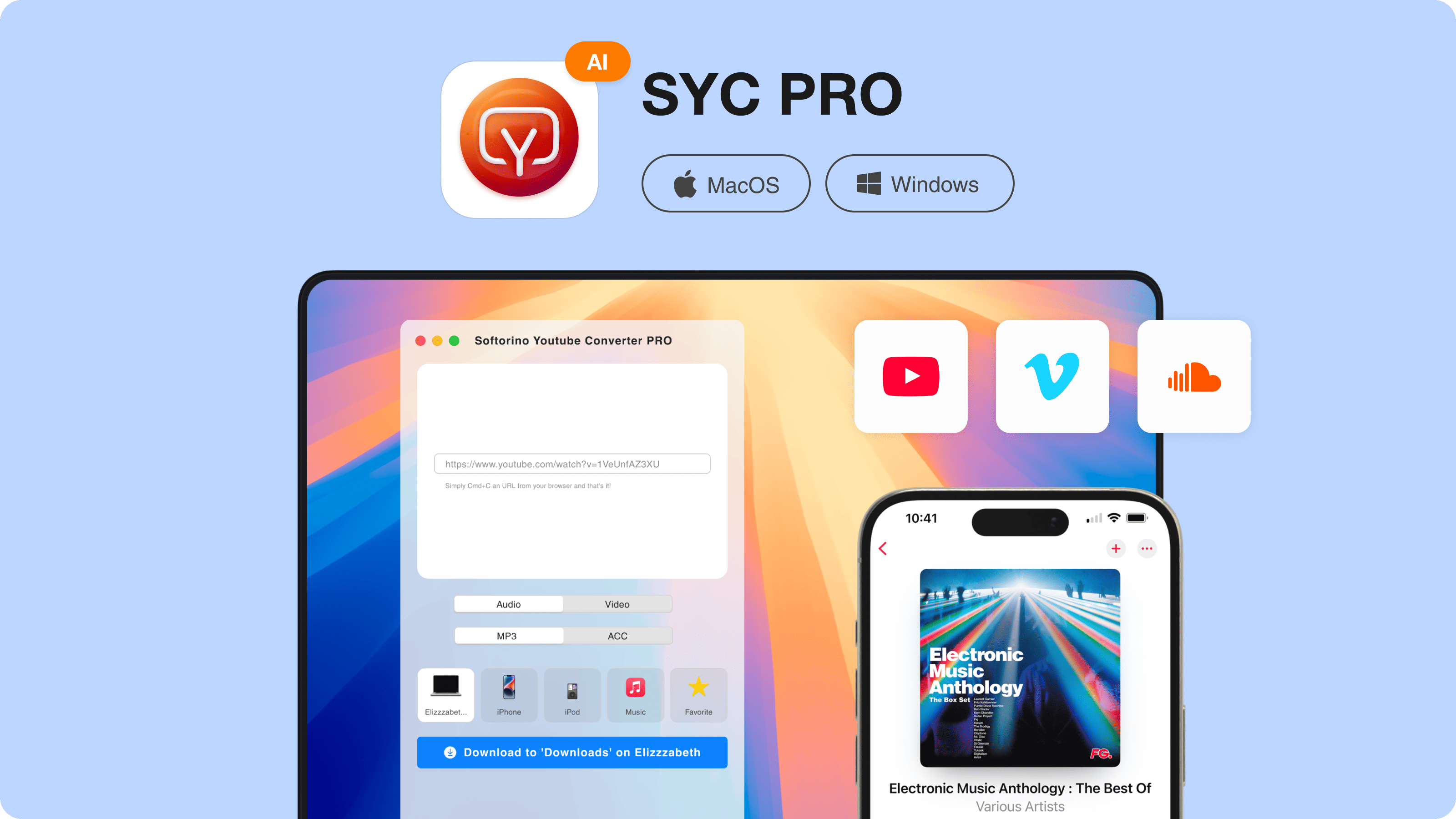
Download SYC PRO on your Mac or Windows PC. Use the official Softorino page, install the app, and start the trial if you want to test the workflow first.
Step 2: Copy the video URL
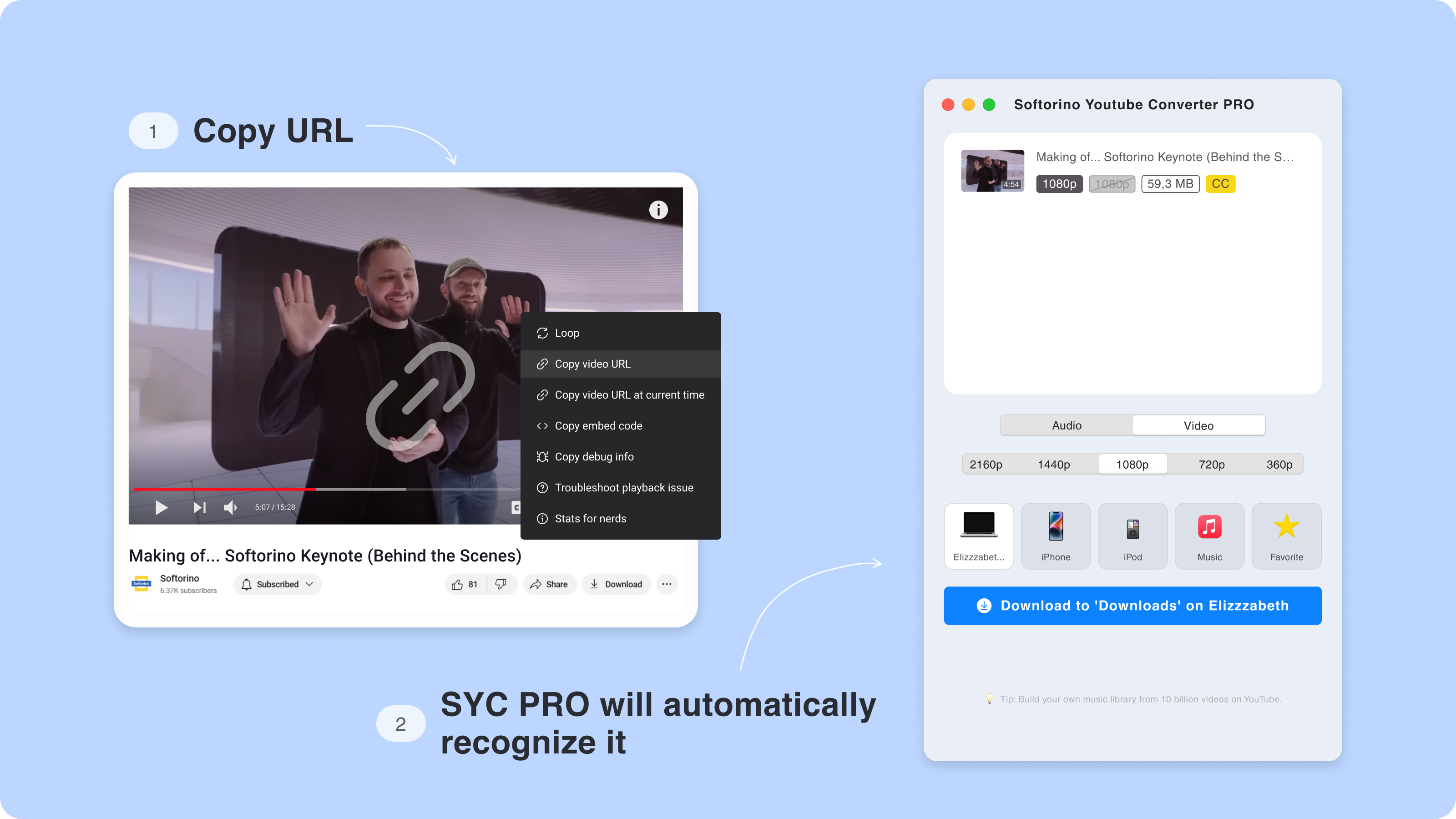
Open the video you have rights to save. Copy the URL from your browser. SYC PRO detects the copied link, so you do not need to drag files between apps.
Step 3: Choose MP4, MP3, quality, and destination
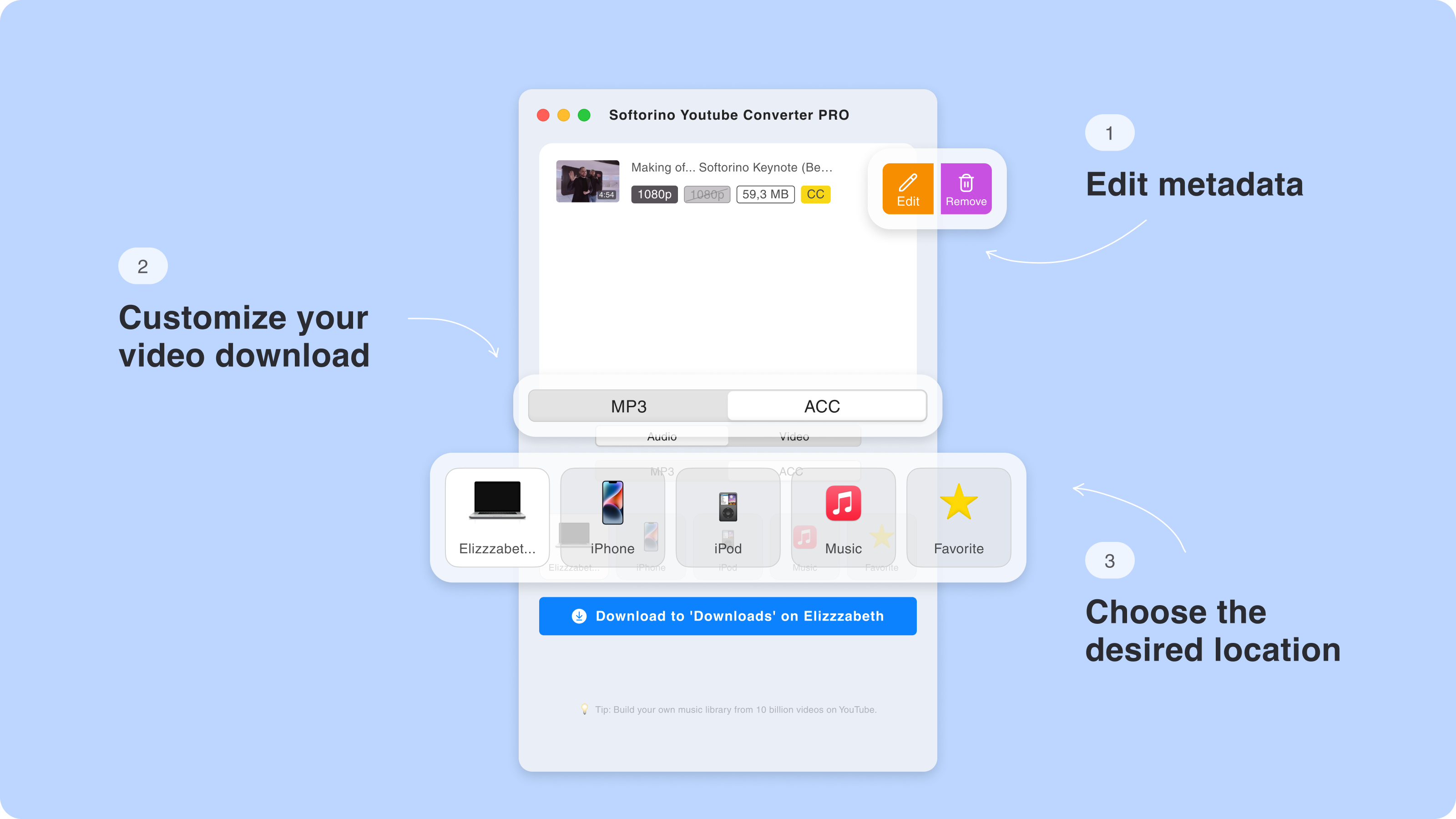
Choose MP4 for video or MP3 for audio. If the source supports it, you can also choose higher quality, subtitles, playlists, or metadata details. Then choose the destination: your computer, iPhone, or iPad.
Step 4: Download and transfer
Start the download. SYC PRO saves the file and sends it to the destination you chose. If you picked iPhone or iPad, you skip the usual iTunes/Finder sync mess.
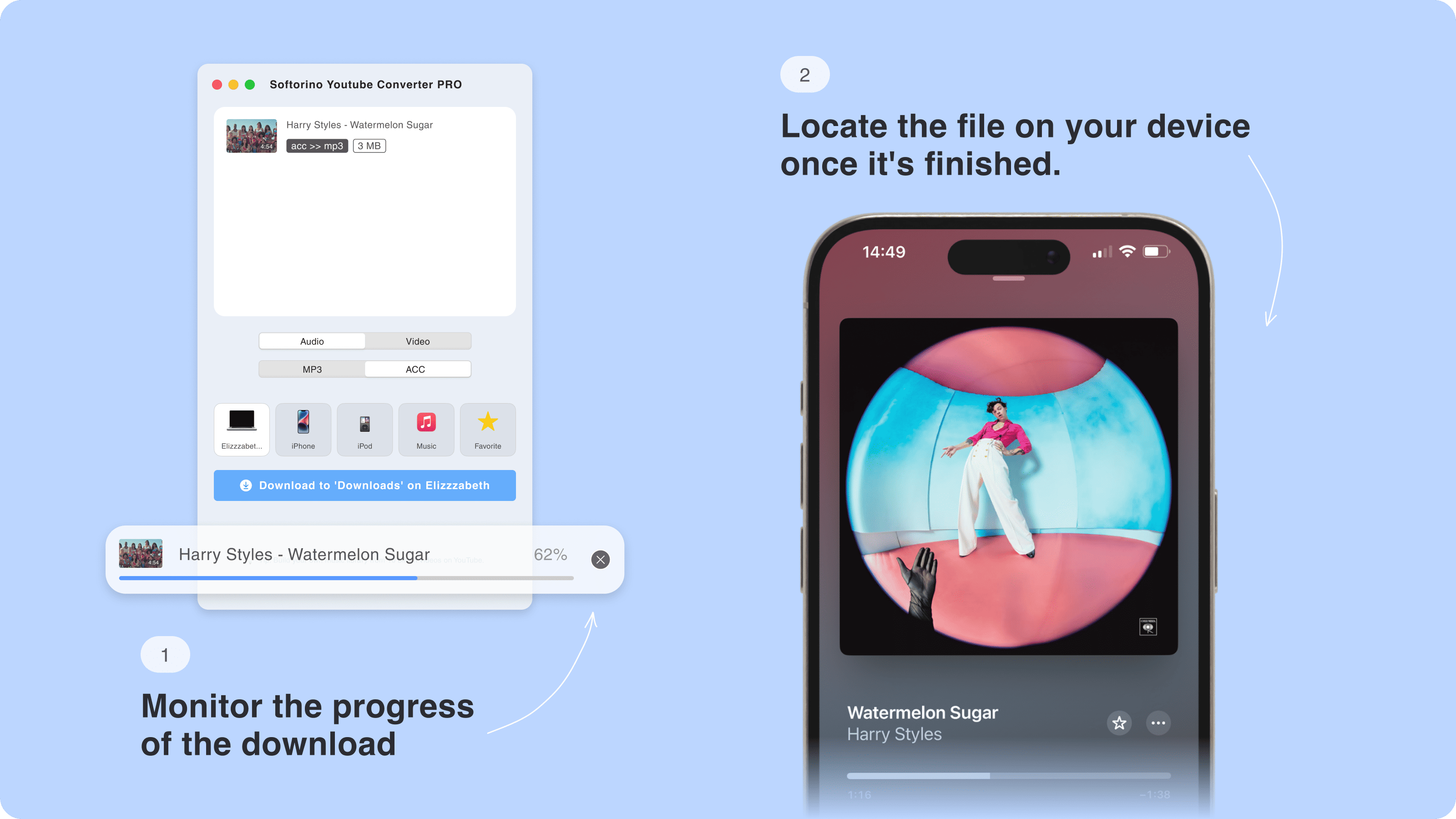
That is the difference. SnapDownloader can get the file onto your computer. SYC PRO can get the allowed video or audio onto the device where you will use it.
Where SnapDownloader gets annoying for Apple users
SnapDownloader is not the villain. It can do the desktop download job. The weak spot is the Apple-device workflow.
Here is where users usually hit friction:
- The app downloads to the computer, not straight to iPhone or iPad.
- Manual sync can put files in confusing places.
- iTunes on Windows is still iTunes on Windows. Sorry.
- Finder sync works, but it is more setup than most people want.
- Cloud transfer adds upload time, storage limits, or privacy questions.
- A subscription feels heavy if you only need a few offline files.
If you live on your Mac or PC, those issues may not matter. If you are saving a video for a commute, gym session, flight, or offline listening on iPhone, they matter fast.

Safe downloading rules before you save any video
A safe app does not make every download safe, legal, or allowed. Keep the rights check separate from the malware check.
Use downloaders for:
- Videos you created.
- Videos you own or licensed.
- Public-domain videos.
- Content where the creator gives permission.
- Platform-approved offline or export use.
Do not use any downloader to bypass DRM, paywalls, private access, age gates, geoblocks, or copyright rules. If a platform offers an official offline option, that may be the right route for that content.
This is also why free online converters are a bad default. Many sites bury the real download button under ads, request sketchy permissions, or push browser extensions you did not ask for. A desktop app from a known publisher is easier to reason about.
Should you use SnapDownloader?
Use SnapDownloader if you want a desktop downloader, you download often enough to justify the current plan, and you are comfortable moving files to Apple devices yourself.
Use SYC PRO if you want the full Apple-device workflow. It is the better SnapDownloader alternative for users who care less about collecting files on a desktop and more about getting allowed MP4 or MP3 files onto iPhone or iPad.
If you also use other Softorino tools, the Softorino Universal License may make more sense than paying for separate utilities. One subscription covers the core Softorino apps, including SYC PRO.

FAQ
Is SnapDownloader safe?
Yes, SnapDownloader is generally safe when you download it from the official website. Avoid cracked installers, fake ads, mirrors, and any installer your security software flags.
Is SnapDownloader free?
SnapDownloader may offer a trial or limited free use, but plan details can change. Check the current pricing page before you start a trial or enter payment details.
Is SnapDownloader a subscription?
SnapDownloader has used paid plans, and current pricing can change over time. Read the latest monthly, yearly, renewal, cancellation, and refund terms on SnapDownloader's site before buying.
Can SnapDownloader transfer videos to iPhone or iPad?
SnapDownloader downloads videos to your computer. It does not give you the same direct iPhone/iPad transfer workflow that SYC PRO provides, so you may still need Finder, iTunes, Files, AirDrop, or another transfer method.
What is the best SnapDownloader alternative for iPhone users?
SYC PRO is the better fit if your goal is to download allowed videos or audio and send them to iPhone or iPad without manual iTunes/Finder syncing.
Can SnapDownloader download age-restricted or private videos?
Do not assume it can or should. Age-restricted, private, DRM-protected, or restricted videos may violate platform rules or require permissions. Use downloaders only when you have the right to save the content.

SYC PRO
Download Web Videos Like a PRO
