Is YTD Downloader Safe? Security Risks, Limits, and Better Alternative


Quick answer: is YTD Downloader safe?
YTD Downloader is not automatically a virus, but you should treat it with caution. Security vendors have flagged YTD-related installers as potentially unwanted programs, and fake mirror sites make the risk worse. If you install it, use the official source only, decline bundled offers, and scan the installer first.
The bigger problem is practical: YTD Downloader can feel cheap until the ads, limits, and extra transfer steps show up. If you want a cleaner Mac or Windows app that downloads MP4 or MP3 and sends the result to your iPhone without iTunes, download YouTube videos with SYC PRO instead.

Before we begin
Download SYC PRO on Mac or Windows when you want a focused YTD Downloader alternative for permitted video or audio downloads. Test one file first and confirm the source, format, and destination before processing a playlist.
What is YTD Downloader?
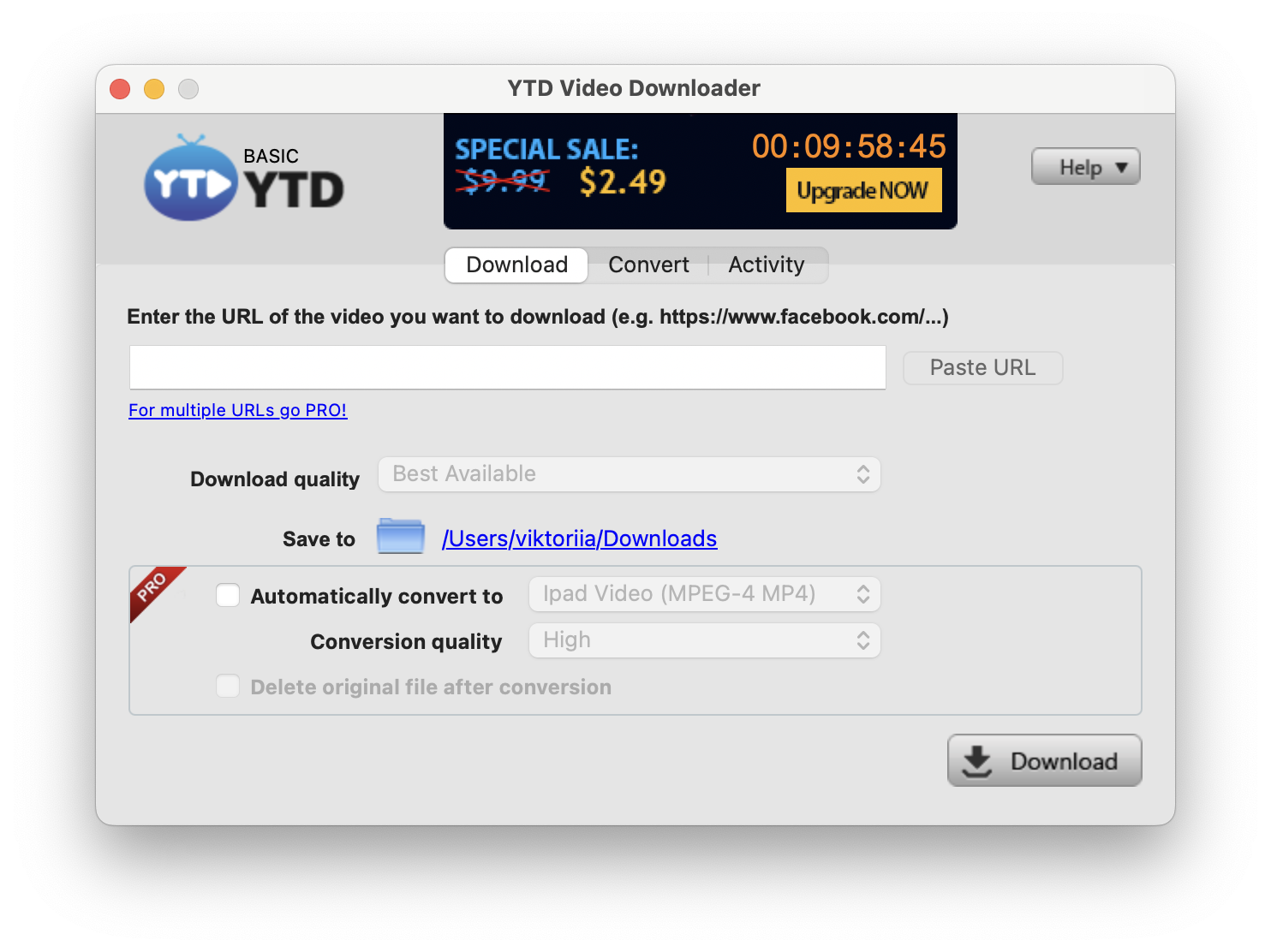
YTD Downloader, also called YouTube Downloader, is a desktop app for saving online videos to a computer. Users usually install it to download YouTube videos, convert clips to MP4 or MP3, or keep a tutorial offline.
That sounds simple enough. The safety question starts during installation. Free downloader apps often rely on ads, browser offers, bundled installers, or upgrade prompts to make money. That does not make every installer malicious, but it does give careful users a reason to slow down.
A safe YouTube downloader should do 3 things well:
- Download from the source you choose.
- Avoid surprise browser extensions, add-ons, or system changes.
- Give you a clean way to save the file where you need it.
YTD Downloader may handle the first job for some users. The second and third jobs are where complaints usually begin.
Why antivirus tools may flag YTD Downloader
Antivirus tools can flag YTD Downloader because of potentially unwanted program behavior, not always because of destructive malware. A PUP is software that may install extra components, push ads, change browser behavior, or bundle offers you did not clearly ask for.
That difference matters. Calling YTD Downloader a virus is too broad. Calling it risk-free is also too generous.
The main red flags to watch for are:
- Bundled offers during installation.
- Browser extensions or search changes hidden behind default setup screens.
- Ads and popups inside the free version.
- Installer files from mirror sites instead of the official source.
- Old installers shared on download portals with unclear ownership.
If your antivirus flags a YTD installer, do not ignore it because a forum post says the app is harmless. Cancel the install, delete the file, download from the official YTD site if you still want to proceed, and scan again.
YTD Downloader is best treated as a caution app: not proven dangerous in every case, but risky enough that you should avoid rushed installs and random mirror downloads.
For broader safety context, Malwarebytes lists YTD-related detections under PUP categories, and YouTube's terms also matter when you decide what you are allowed to save offline.
YTD Downloader free version: what the limits mean
The free version is the part that frustrates most users. Reports and older product messaging commonly point to limits such as 720p quality, ads, slower downloads, and a one-download-per-day cap. These limits can change, so check the current YTD pricing page before you rely on them.
Even when the exact numbers change, the pattern is clear: the free tier is designed to push upgrades. That is normal for software. It becomes annoying when the free version also brings security warnings, ads, and extra transfer work.
If you only need one short video on your computer, YTD Downloader might be enough. If you want playlists, subtitles, higher quality, MP3 audio, or iPhone playback, the free workflow gets messy fast.
YTD Downloader vs SYC PRO vs other safe options
No downloader fits every use case. YouTube Premium is the official offline option inside YouTube. Command-line tools fit technical users. Online converters look fast, but many are ad-heavy and full of fake buttons. SYC PRO fits users who want a clean desktop workflow and Apple-device transfer.
Option | Safety profile | Best fit | Main tradeoff |
|---|---|---|---|
YTD Downloader | Caution needed because of PUP and bundled-installer history | Occasional computer-only downloads | Ads, limits, and no direct iPhone transfer |
SYC PRO | Clean Mac and Windows app from Softorino | MP4/MP3 downloads and iPhone/iPad transfer without iTunes | Paid Softorino product after trial |
YouTube Premium | Official YouTube offline option | Watching inside YouTube's app | Does not give you transferable MP4 or MP3 files |
Online converters | High caution because of ads, fake buttons, and privacy risk | One-off low-stakes downloads | Often unreliable and messy |
Command-line tools | Safe for technical users who know what they are installing | Power users and scripts | Not friendly for normal iPhone users |
For Softorino readers, the biggest difference is not only download quality. It is what happens after the file exists. YTD Downloader leaves you with a file on your computer. SYC PRO can move the result to your iPhone or iPad without iTunes or Finder gymnastics.
Does YTD Downloader work on iPhone or iPad?
YTD Downloader does not give you a proper iPhone or iPad workflow. It is mainly a desktop downloader. If you want the video on your phone, you still need another transfer step.
That usually means:
- Download the video to your computer.
- Connect your iPhone or iPad.
- Use Finder, iTunes, Files, AirDrop, cloud storage, or another app.
- Hope the format plays where you want it.
This is where many downloader tools fall apart. They solve the download but not the Apple-device problem. SYC PRO was built for that whole path: copy a video URL, choose MP4 or MP3, pick the destination, and send it to your iPhone or iPad without iTunes.
If you want a deeper workflow, see how to convert YouTube to MP4 or download YouTube videos with subtitles.
How to install or remove YTD Downloader safely
If you still want to try YTD Downloader, treat the installer like any other risky free utility. Do not click through setup screens on autopilot.
Use this checklist:
- Download only from the official YTD website.
- Avoid mirror sites, software portals, and repacked installers.
- Choose custom installation if the installer offers it.
- Decline browser extensions, search changes, toolbars, or extra apps.
- Scan the installer before opening it.
- Keep your antivirus active during installation.
- Delete the installer after setup so you do not reuse an outdated file later.
To remove YTD Downloader, start with your operating system's normal uninstall process. Then check your browser extensions, default search engine, startup items, and installed apps list. If your antivirus previously flagged the installer, run a full scan after uninstalling.
That removal work is the part nobody wants. The safest install is the one that does not add mystery software in the first place.

How to download videos the cleaner way with SYC PRO
SYC PRO is the better fit if you came here because YTD Downloader looked sketchy, limited, or too computer-only. It is made for Mac and Windows users who want MP4 video, MP3 audio, playlists, subtitles, and direct iPhone or iPad transfer.
Use it for videos you own, created, licensed, have permission to save, or are allowed to download under the platform's rules. Do not use any downloader to bypass DRM, private videos, paid access, or copyright restrictions.
Step 1: Install SYC PRO on Mac or Windows
Install Softorino YouTube Converter PRO on your computer. Start the trial if you want to test the workflow first. You do not need to install browser extensions or extra download managers.
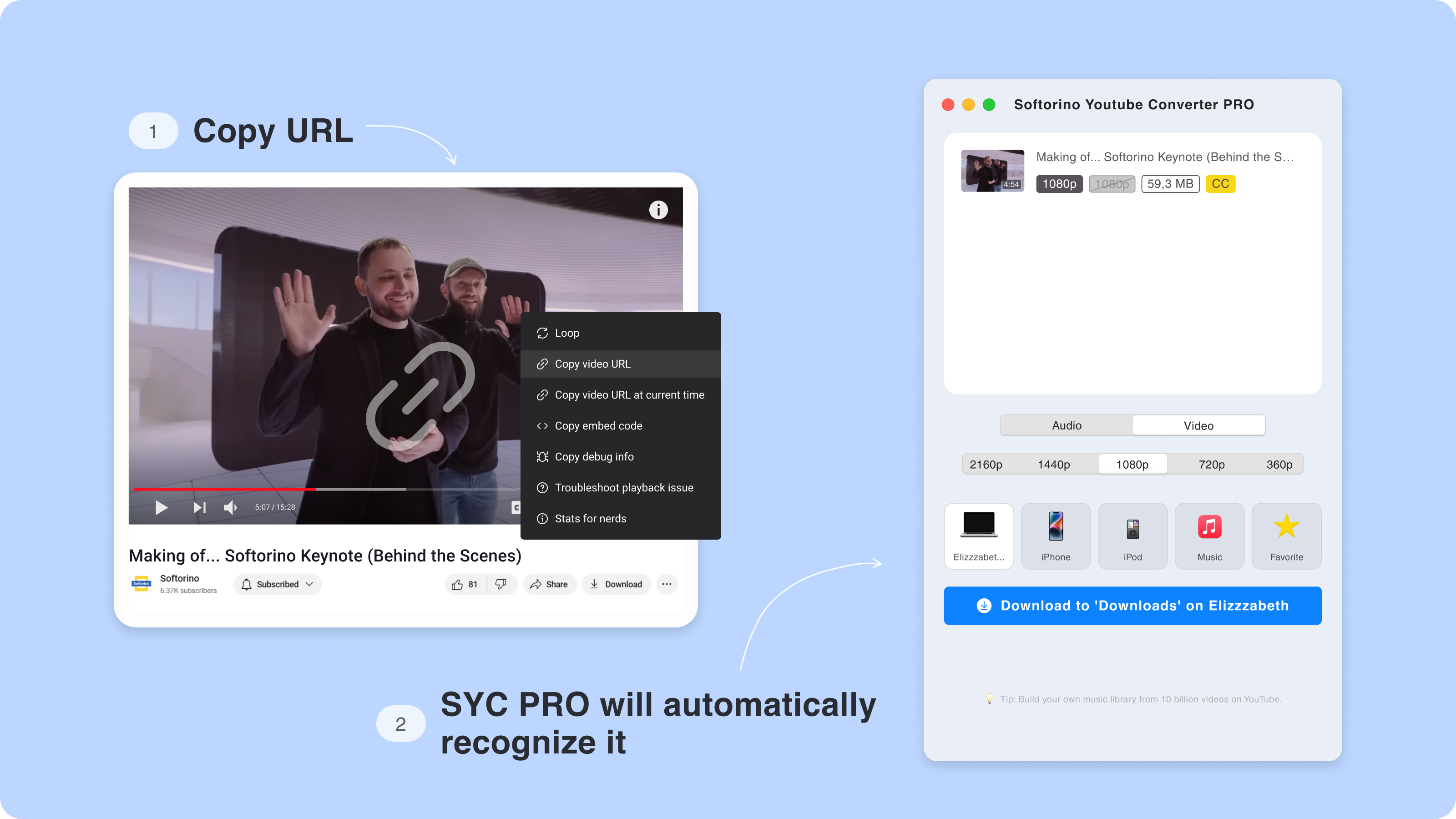
Step 2: Copy the video URL
Open the video in your browser and copy the URL. SYC PRO detects the copied link, so you do not need to paste it into a random website full of fake download buttons.
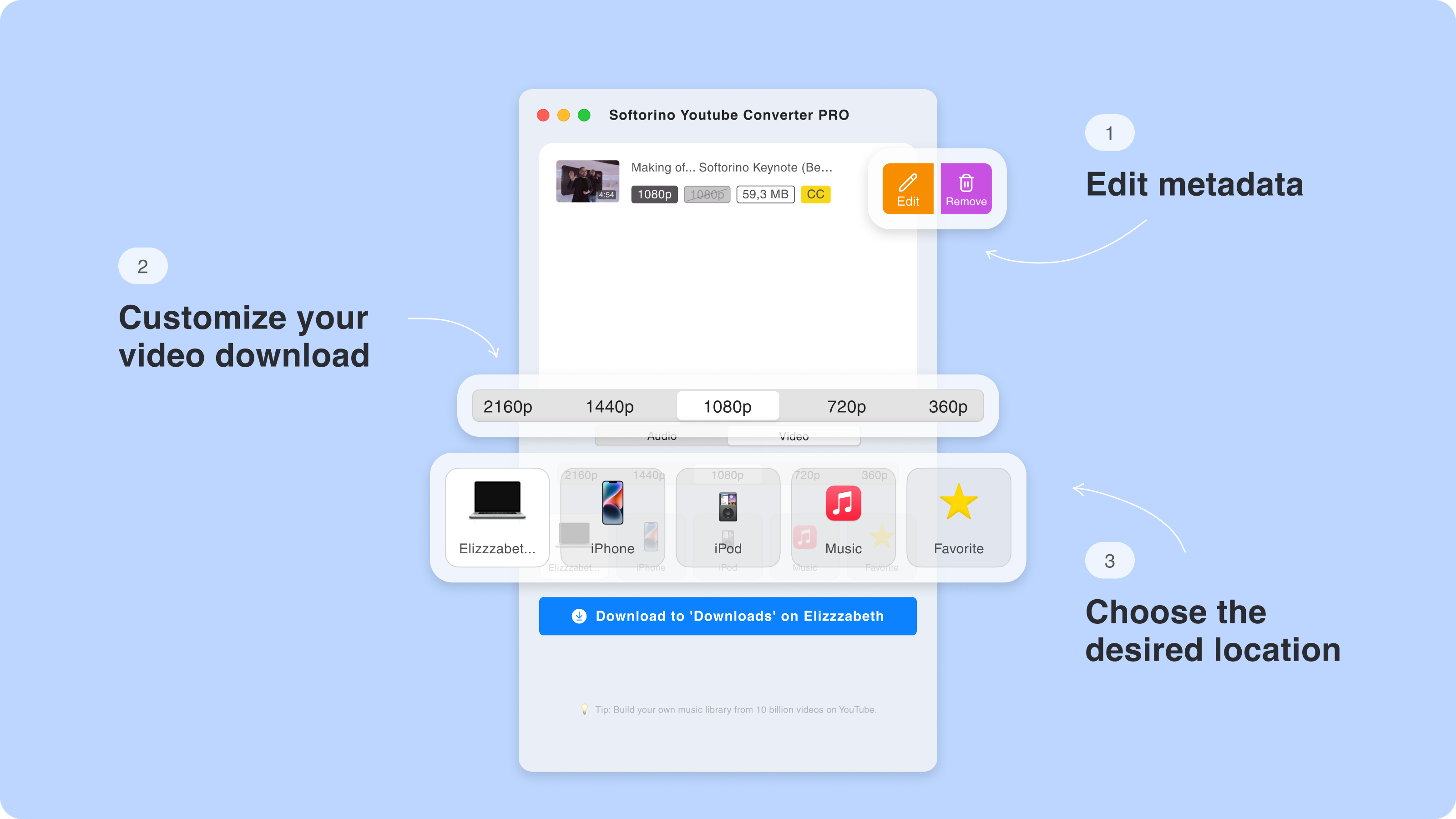
Step 3: Choose MP4, MP3, quality, and destination
Pick the format you need. Use MP4 for video, MP3 for audio, and choose subtitle or playlist options when the source supports them. High-resolution downloads depend on the source video, so do not assume every clip has 4K available.
You can save the result to your computer or send it to an iPhone or iPad. That is the whole point: no iTunes sync, no Finder shuffle, no "where did this file go?" moment.
Step 4: Convert and transfer
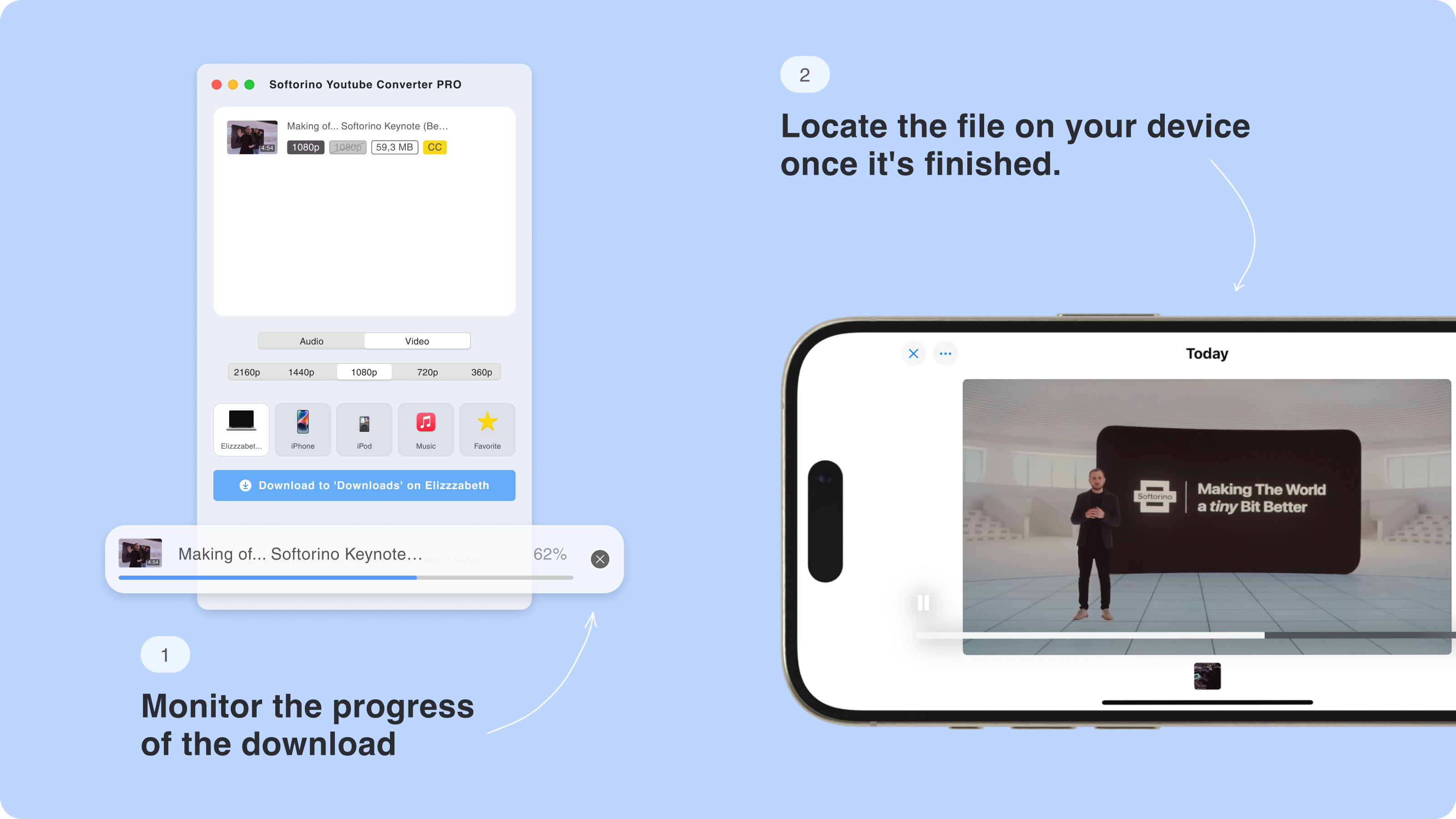
Click Convert & Transfer. SYC PRO handles the download and sends the file to the destination you chose. For Apple-device users, that is the cleaner workflow YTD Downloader does not offer.
If your main issue is large files, read the Softorino guide to download long YouTube videos without failed transfers. If you work with playlists, use the guide to download YouTube playlists.
Is YTD Downloader for Mac different from Windows?
YTD Downloader has historically been more associated with Windows. Mac support and feature parity can vary by version, and many search results still point users toward Windows-heavy download pages.
That matters for safety. Mac users often end up on unofficial download portals when a product's Mac page is unclear, outdated, or hard to find. Those mirror downloads create more risk than the app name itself.
If you are on Mac and need YouTube video or audio offline, use a current Mac app from a known vendor. SYC PRO supports Mac and Windows, so you do not need to hunt through download mirrors.
Safe and legal downloading rules
The safest downloader workflow still needs legal common sense. Download only content you own, created, licensed, have permission to save, or can download under the platform's rules. YouTube Premium remains the official option for offline viewing inside YouTube.
Do not use YTD Downloader, SYC PRO, or any other tool to bypass private videos, DRM, paid access, or copyright limits. A clean app does not make a bad download legal.
For audio-only workflows, use a rights-aware tool and avoid sketchy converter sites. Softorino's guide to a safe YouTube to MP3 converter covers the same safety mindset for music and podcasts.
Final verdict: is YTD Downloader safe enough to use?
YTD Downloader is not automatically a virus, but it is not the downloader I would install casually. The PUP history, bundled-offer risk, mirror-site problem, ads, and iPhone transfer gap make it a poor fit for users who want a clean offline-video workflow.
Use YTD Downloader only if you download it from the official source, scan the installer, decline extras, and accept the free-version limits. If your goal is to save MP4 or MP3 files and get them onto an iPhone or iPad without iTunes, use SYC PRO instead.
The less time you spend fighting installers, the faster you get to the video you wanted in the first place.
FAQ
Is YTD Downloader a virus?
YTD Downloader is not automatically a virus, but YTD-related installers have been flagged as potentially unwanted programs by security vendors. Treat it with caution, avoid mirror sites, and scan the installer before opening it.
Why does antivirus flag YTD Downloader?
Antivirus tools may flag YTD Downloader because of bundled offers, adware-style behavior, browser changes, or installer reputation. A PUP warning is not the same as a destructive malware verdict, but you should still take it seriously.
Is YTD Downloader free?
YTD Downloader has a free tier, but it has been associated with ads and practical limits such as daily download caps or quality restrictions. Check the current YTD plan page before relying on any exact limit.
Can YTD Downloader download videos in 4K?
YTD Downloader's 4K support depends on the version, plan, and source video. Do not assume the free version can download every video in 4K. Check the current app limits before you install it.
What is the safest YTD Downloader alternative for iPhone?
SYC PRO is the better Softorino alternative for iPhone users because it downloads MP4 or MP3 and transfers the result to iPhone or iPad without iTunes. It also avoids the sketchy online-converter workflow.
How do I transfer YTD Downloader videos to my iPhone?
YTD Downloader does not include a clean direct iPhone transfer workflow. You usually need Finder, iTunes, Files, AirDrop, cloud storage, or another transfer app. SYC PRO removes that extra step by sending downloads to your iPhone or iPad from the same workflow.

SYC PRO
Download Web Videos Like a PRO
