6 CleanMyMac Alternatives for App Removal and Cleanup

CleanMyMac alternatives: quick answer
TL;DR: The best CleanMyMac alternatives depend on which features you use. Choose CleanAppsNow for focused Mac app removal and leftover review, AppCleaner for a free drag-and-drop uninstaller, or DaisyDisk to find large files with a visual disk map. None replaces every part of CleanMyMac. If you rely on its malware scanning, updates and cleanup together, check those needs before switching. Keeping the suite may be the better choice.
Tool | Best for | Main limitation |
|---|---|---|
CleanAppsNow | Apps and leftovers | Paid license; not a full suite |
AppCleaner | Free app removal | Not broad disk cleanup |
DaisyDisk | Finding large files | Not app-leftover matching |
Before we begin
Download CleanAppsNow for Mac if your main job is removing unwanted apps and reviewing their related files. Check the license terms before activating it, and review files before removal. Choose a different category below if you need disk analysis or system maintenance instead.
Why listen to us?
Softorino makes CleanAppsNow and publishes this guide. We recommend other tools when they fit the job better, including a free remover and built-in macOS options. This is a vendor-written comparison, not an independent endorsement.
CleanMyMac alternatives compared at a glance
Tool | Main replacement job | Review or control | Observed price | Main caution |
|---|---|---|---|---|
CleanAppsNow | Apps and leftovers | Related-file preview | $5.99 first-year promotion; subscription | Renewal charge unverified |
AppCleaner | Basic app removal | Related-file list | Free | Pick the right macOS build |
DaisyDisk | Find large files | Disk map and preview | $9.99 one-time | Not a leftover matcher |
App Cleaner & Uninstaller | App management | Apps, leftovers, startup items | €13.33/year or €31.16 once; 1 Mac | Wider cleanup needs a bundle |
OnyX | System maintenance | Task-specific controls | Free; donations optional | Build must match macOS |
Pearcleaner | Apps and orphaned files | Search settings and exclusions | Free; source-available | Development on indefinite hold |
Price check: October 15, 2026. These are official-page observations, not final checkout quotes. Dollar amounts retain the vendors' displayed $ currency; Nektony served EUR prices, not US-dollar quotes. Offers, taxes and regional totals can change. CleanAppsNow's introductory offer is not its verified renewal price.
CleanMyMac is the full-suite reference, not a seventh alternative. MacPaw documents cleanup, malware scanning, app removal, updates and file decluttering. A free uninstaller can replace one part of that package without replacing the rest.
How these tools were compared
This comparison uses official product pages, help text and license terms reviewed on October 15, 2026. No apps were installed or tested for this review. There are no measured speed, removal-accuracy, privacy or space-recovery scores. The CleanAppsNow image is an existing vendor screenshot cropped for privacy, not a new test.
Each tool faces the same questions: what job does it replace, what can you review before deletion, and what does it leave out? Price, macOS support and ongoing updates also affect the choice. Features documented by a maker are not proof of safe removal in every case.
Quick takeaways before choosing
- App removal, disk-space analysis and system maintenance are separate jobs.
- A free remover may be enough for an occasional uninstall.
- A disk analyzer helps with large personal files, not just app leftovers.
- A suite can still be useful when you use several of its functions.
- Current support matters: Pearcleaner's developer has paused active work.
If app removal is your entire requirement, the narrower Mac app uninstaller comparison covers that decision. The list below focuses on leaving a broader suite without losing a feature you need.
1. CleanAppsNow: focused app and leftover removal
Verdict: Consider CleanAppsNow if you use CleanMyMac mainly to remove apps and review related files. It also makes sense if you already pay for Softorino's apps. It is not a replacement for the suite's security features.
CleanAppsNow's official page describes a drag-and-drop workflow. Add an app, locate its associated files, preview the results and decide what to remove. The task starts with an app you recognize, rather than a general recommendation to clean the whole system.
CleanAppsNow key features
- App removal with related-file discovery and preview.
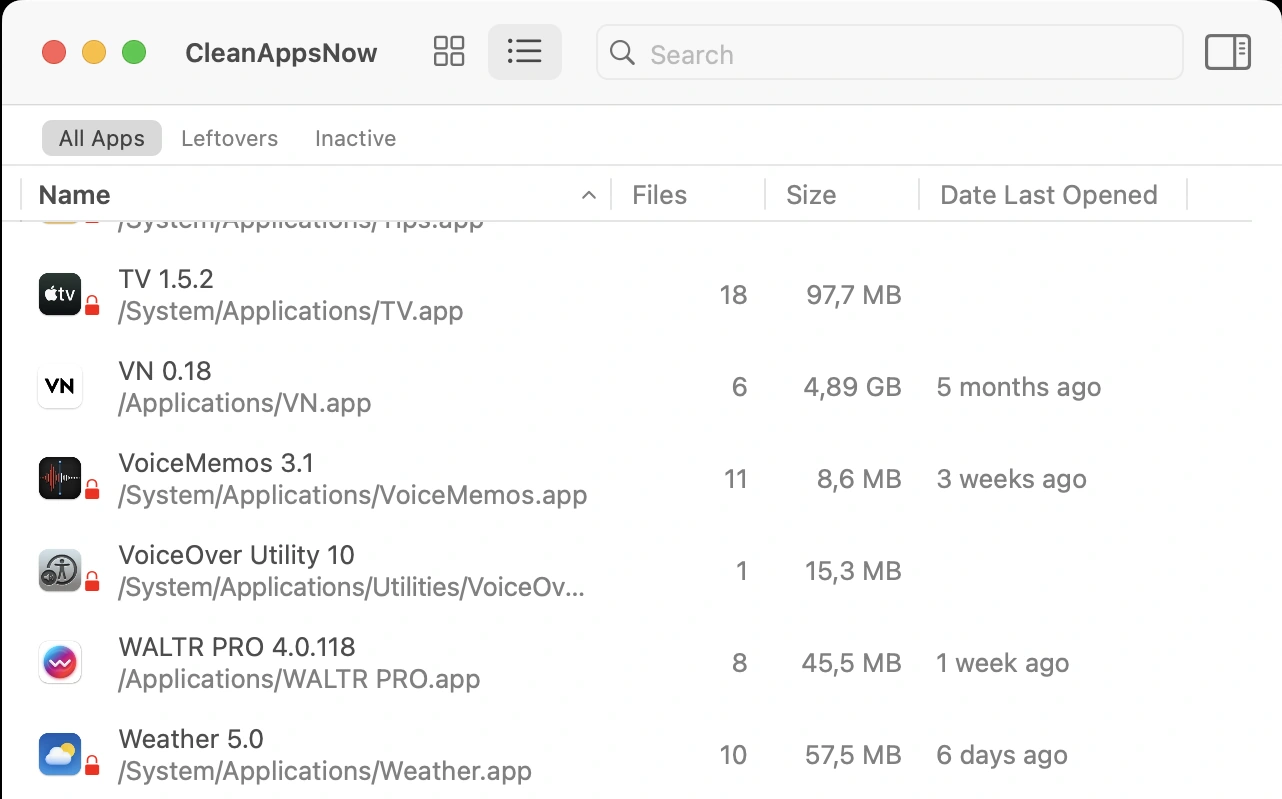
- A Leftovers group for service files remaining after manual removal.
- An Inactive group for apps untouched for more than six months.
- Drag-and-drop input on macOS.
The app list separates installed apps from leftovers and inactive apps. That helps frame two different jobs: removing software you still have and reviewing files from software you already deleted. Rare use alone is not a reason to remove an app.
CleanAppsNow pros
- Focused scope for buyers who want app cleanup rather than a broad suite.
- File preview lets you check what is selected before removal.
- An existing Universal License can cover this app alongside other Softorino tools.
CleanAppsNow limitations
- No verified malware protection, RAM speedup or full disk-analysis feature set.
- The Outdated group describes legacy software architecture, not an automatic updater.
- The reviewed pages did not establish a clear minimum macOS version.
Confirm support for your Mac before paying. Review shared files with care, especially when several apps come from the same maker. Do not read the product page's promise to remove all hidden files as a guarantee for every installation.
CleanAppsNow pricing
Activation requires Softorino's Universal License subscription. The official FAQ says there is no separate individual-app license. The plan renews automatically and permits one active machine at a time, with each app and OS activated separately.
The observed $5.99 offer is for the first year. The page also displayed a $39.96 reference price, but it did not establish that as the renewal charge. Check renewal terms at checkout. A free download does not mean permanent free use of the full product.
Who CleanAppsNow is best for
Mac users who want app removal and leftover review, particularly those who also use other Softorino apps. Choose AppCleaner if a free license matters most. Choose a disk analyzer if large documents, rather than unwanted apps, fill your storage.
2. AppCleaner: a free choice for occasional uninstalling
Verdict: AppCleaner is the first option to consider when you want a free replacement for CleanMyMac's basic uninstalling role. You do not need a purchase decision just to remove an unwanted app and review its related files.
FreeMacSoft's AppCleaner follows a simple process. Drop an application onto its window, inspect the files it finds, then use the delete control. Its official site offers downloads directly, with separate builds for different macOS versions.
AppCleaner key features
- Drag-and-drop app selection.
- A list of related files to review before deletion.
- A delete control for the selected app and files.
- Download choices for current and older macOS versions.
AppCleaner pros
- Free access for a narrow, common task.
- No need to buy a larger suite for occasional removal.
- Older builds give owners of older Macs a version to check against their system.
The price is a real advantage. If you remove a few ordinary applications each year, a paid tool may add little that you need. Judge the file list by whether it lets you understand the removal, not by the number of files found.
AppCleaner limitations
- The official feature description centers on uninstalling, not full-system cleanup.
- A disk-space map, malware scanner and update dashboard are not established features.
- The newest download may not be the right build for an older Mac.
The reviewed page lists version 3.7 for macOS 15 and later. Version 3.6.8 covers macOS 10.14 through 15.6, with more older builds available. Check your system version before choosing a download.
You may want to keep some settings for a later reinstall. Files another app needs also deserve care. Use the selected-file review instead of assuming that every suggested item is safe or useful to delete.
AppCleaner pricing
Free from FreeMacSoft. AppCleaner is not Nektony's App Cleaner & Uninstaller, which has paid Pro features. Similar names do not mean the same app, so check the developer and download domain before comparing costs.
Who AppCleaner is best for
People who want occasional app cleanup without another subscription. If your main question is what occupies the disk, start with macOS Storage settings or a disk analyzer. An app remover answers a narrower question than a storage map.
3. DaisyDisk: for finding what actually uses your storage
Verdict: DaisyDisk fits when you mainly use CleanMyMac to find what takes up disk space. It helps you identify large files and folders, then decide what to remove. Choose an uninstaller instead when your target is app-specific leftovers.
DaisyDisk shows disk usage as a visual map. You can inspect the areas using space and press Space to preview a selected file. That helps when you recognize a folder but need to see its contents before deciding what to keep.
DaisyDisk key features
- A visual breakdown of disk use by files and folders.
- File preview before deletion.
- Support for different disks, with cloud-storage features also documented.
- User-selected removal rather than an instruction to delete every large item.
Think of old video exports on a nearly full Mac. Uninstalling apps could leave those files untouched. A disk map directs attention to the files using the space, so you can decide whether to keep, move or delete them.
DaisyDisk pros
- A clear view of large-file problems that app removers do not address.
- Preview and selection keep the decision with you.
- One-time personal licensing avoids recurring charges.
DaisyDisk limitations
- A disk map does not identify all files associated with an app.
- Some access and scanning features depend on permissions or edition.
- A visible file is not automatically safe to delete.
Read the help pages before granting extra access. In particular, a large System Data category is not a single disposable folder. Keep a backup rather than relying on a tool's safety checks to catch every bad choice.
DaisyDisk pricing
The official page lists $9.99 for a lifetime personal license, with no recurring payments. It allows use on up to five personal Macs and includes minor updates and bug fixes. A trial is available; check separate terms if you need business licensing.
The published requirement is macOS 10.13 or newer, with Intel and Apple Silicon support. An older Mac may therefore have an option here, but check current requirements before buying or using a beta operating system.
Who DaisyDisk is best for
People who want to understand a full disk and prefer a one-time purchase. For ordinary file cleanup, read the disk-space guide first. Built-in tools may already show enough information to solve your problem.
4. App Cleaner & Uninstaller: paid app management beyond removal
Verdict: Nektony's App Cleaner & Uninstaller deserves a look if you want uninstalling, app updates and startup-item management together. It covers more app-management needs than a basic remover, without being the same as Nektony's wider cleanup bundle.
The official product page lists removal, leftover discovery, startup programs, extensions, updates and permission review. These are useful comparison points if you would miss CleanMyMac's app-management tools after switching.
App Cleaner & Uninstaller key features
- App and related-file removal, including remaining files.
- Startup-item and extension management.
- Software-update features alongside uninstalling.
- Permission information for reviewing app access.
App Cleaner & Uninstaller pros
- A middle option between a minimal remover and a broad suite.
- App-management controls stay together rather than requiring separate tools for each job.
- A one-time purchase is available if you prefer not to renew a subscription.
If you regularly check which apps start at login or need updates, those controls may matter more than the simplest possible removal window. Compare the functions you use, rather than choosing solely by the length of the feature list.
App Cleaner & Uninstaller limitations
- Disk analysis and duplicate finding belong to the broader MacCleaner Pro bundle.
- The Pro trial lasts two days; the free mode afterward is limited.
- Permission and notarization information does not prove that an app is harmless.
After the trial, the free version can scan and help you find leftovers manually. That is not unlimited free use of the paid removal workflow. Check whether the trial gives you enough time to assess the controls you actually need.
App Cleaner & Uninstaller pricing
The official buy page served €13.33 per year or €31.16 paid once for one Mac. It also listed a monthly plan at €7.09. These are observed EUR prices, not converted US-dollar quotes.
Subscriptions renew unless canceled. The one-time license includes minor updates and bug fixes, but major upgrades can cost extra. Confirm the number of Macs and the final tax-inclusive total. The standalone app and MacCleaner Pro bundle have different prices and features.
Who App Cleaner & Uninstaller is best for
Buyers who want removal plus ongoing app-management controls. AppCleaner may be enough for a single uninstall. If you also need disk analysis or duplicate finding, compare the actual bundle instead of assuming the standalone license covers them.
5. OnyX: free maintenance for a specific task
Verdict: Choose OnyX for a maintenance task you understand and can match to its documentation. It exposes system controls without making you type commands. Having access to many tasks is not a reason to run them all.
Titanium Software's OnyX page lists file-system checks, cache cleanup, database and index rebuilding, settings changes and app uninstalling. Its scope is wider than older comparisons sometimes suggest. The important question is which function solves your problem.
OnyX key features
- System maintenance and cleaning controls.
- Rebuilding of certain databases and indexes.
- Settings for Finder, Dock, Safari and other Apple apps.
- App uninstalling among its documented functions.
OnyX pros
- Free access to specific system tasks.
- A graphical alternative to some command-line operations.
- Separate downloads for different macOS releases, including older systems.
OnyX can suit a support procedure that calls for a particular action. For example, a documented index problem is a reason to investigate the relevant rebuild control. Routine access to that control does not mean a healthy Mac needs the same action.
OnyX limitations
- Each major macOS release needs its matching OnyX version.
- Older versions remain downloadable but no longer receive updates.
- Broad maintenance controls demand more care than basic app removal.
Titanium explicitly warns against using a build intended for an earlier operating system. Match the download to your Mac's OS and processor requirements. Do not pick a file simply because its version number is highest.
Clearing caches or rebuilding an index is not a guaranteed speed boost. Avoid running every task to imitate a suite's one-click cleanup. If you cannot explain why you need a task, leave it alone until you understand its effect.
OnyX pricing
Free, with optional donations to the developer. The official download page does not require a paid subscription. Choose a build based on its requirements and support status, not merely the fact that it is still available.
Who OnyX is best for
Users with a specific maintenance need and enough context to choose the right action. AppCleaner is a more focused starting point for occasional removal. DaisyDisk addresses a different problem when personal files, not system maintenance, are the concern.
6. Pearcleaner: capable, but active development is on hold
Verdict: Pearcleaner offers many free tools, but its maker has paused active work. Consider it only if you accept that limit. It is not the first choice for someone who expects prompt help or fixes after a macOS change.
The official Pearcleaner repository describes uninstalling, orphaned-file search and extra management tools. Its status notice says active development, issue responses, pull-request reviews and new releases are on hold indefinitely.
Pearcleaner key features
- App removal and orphaned-file discovery.
- Search sensitivity controls and include/exclude directories.
- Package, Homebrew and plugin management tools.
- Source code available under its stated license.
Pearcleaner pros
- Free access to a wider set of controls than basic drag-and-drop removal.
- Search settings let experienced users choose where the app looks.
- Source access allows inspection within the license terms.
Those controls can be useful when you want to set search boundaries. They also give you more decisions to make. An exclusion list does not tell you whether an unfamiliar file belongs to something you still use, so leave uncertain files alone.
Pearcleaner limitations
- The development pause has no announced end date.
- File search needs Full Disk Access, and some system-folder work uses a privileged helper.
- The README excludes beta systems and versions before macOS 13.
The reviewed README lists version 5.4.3 and support for macOS 13, 14, 15 and 26. A supported-system list does not promise future fixes. Check both that list and the status notice before relying on the app after an OS upgrade.
Understand the requested permissions before granting them. The maker also warns about unrelated download sites. Use release links from the official repository or the developer's own site rather than a lookalike download page.
Pearcleaner pricing
Free. Pearcleaner describes itself as source-available and fair-code licensed. Its license combines Apache 2.0 with the Commons Clause; it is not unrestricted open-source licensing. Read the terms if you plan to redistribute or commercialize modified software.
Who Pearcleaner is best for
Users comfortable assessing a source-available utility with an explicit maintenance pause. AppCleaner is the simpler free recommendation for someone who does not want that trade-off. An older roundup calling Pearcleaner actively maintained is not a reason to ignore the current notice.
How to choose between CleanMyMac alternatives
Start with the feature you would miss. For uninstalling, compare CleanAppsNow, AppCleaner and Nektony's remover. For the storage view, look at DaisyDisk. For a specific maintenance task, check OnyX's documentation. Pearcleaner's extra controls come with a support trade-off.
If you rely on integrated malware scanning, updates and cleanup, none of these focused choices is a like-for-like replacement. MacPaw's current CleanMyMac page describes that wider scope. Keeping a suite you use is a reasonable decision.
Price follows the feature check. A free app is good value when it does the job you need. A subscription can make sense when you use several included products. A one-time license avoids renewal billing, but future major upgrades may cost extra.
Use this decision process before changing anything:
- List the CleanMyMac functions you used recently, not every advertised feature.
- Match each necessary function to a tool or built-in macOS option.
- Check your macOS version, license scope and required permissions.
- Review trial and renewal terms before activating a replacement.
- Keep a backup and follow the app vendor's removal instructions when switching.
You do not need to install every product in the table. Start with the smallest combination that covers a real need. If Storage settings explains the problem and you recognize the files, the best purchase may be no purchase.
Deletion and privacy checks before switching
Use the original app's uninstaller when one is provided. Apple's removal guidance recommends that path because apps can place login items, extensions and other data outside the main bundle. Complex software may need its own removal steps.
Back up important data before reviewing leftovers. App-related files can include settings you want for a reinstall. A large file is not automatically disposable, and a folder named after a developer may serve several products.
Grant only access you understand. Full Disk Access gives a utility broad reach; that makes trust in the source important. Read the maker's privacy policy if data handling affects your choice. A local-looking interface alone does not establish that an app never contacts a server.
For basic cleanup, Apple's storage guide explains built-in options. For app-specific removal, use the complete-uninstall guide rather than deleting unfamiliar Library folders by guesswork.
Uninstalling does not cancel a subscription. If cost is your reason for switching, cancel through the provider that bills you. Removing the app and stopping future charges are separate actions.
Frequently asked questions
What is the best free CleanMyMac alternative?
AppCleaner is a strong free choice for app removal, while OnyX suits specific maintenance tasks. Neither replaces every CleanMyMac function. Start with the job you need; macOS Storage settings may be enough if you only want to review large files.
Can CleanAppsNow replace every CleanMyMac feature?
No. CleanAppsNow focuses on Mac app removal and related-file review, including leftover and inactive-app groups. Its verified features do not establish malware protection, a full update manager or every system-cleanup function. Choose it for the removal job rather than a complete suite replacement.
Is Pearcleaner still actively maintained?
Not according to the official notice reviewed on October 15, 2026. Active work, issue responses and new releases are on hold indefinitely. Existing downloads remain listed, but that does not promise future support. Check the current notice before deciding.
Is AppCleaner the same as App Cleaner & Uninstaller?
No. AppCleaner is FreeMacSoft's free utility. App Cleaner & Uninstaller is Nektony's separate product with paid Pro features, a two-day trial and a limited free mode afterward. Check the developer as well as the app name when comparing costs.
Will removing leftovers make my Mac faster?
Not necessarily. Removing unwanted files can free storage, but small preference files are not proof of a slowdown. If your Mac is slow, identify the cause rather than assuming more deletion will fix it. Use cleanup for a specific storage or removal problem.
Does deleting CleanMyMac stop its subscription?
No. Removing CleanMyMac does not cancel its subscription. Use the billing provider's controls and verify cancellation separately. Keep the confirmation and check the renewal date before assuming the next charge has stopped.
Bottom line: replace the functions you need
AppCleaner is a sensible free starting point for removal. DaisyDisk finds large files. Nektony adds app-management controls, OnyX handles specific maintenance tasks, and Pearcleaner carries an explicit development pause.
For focused app removal with leftover review, consider CleanAppsNow and check its license terms. If you depend on CleanMyMac's wider suite, do not give up those functions by accident just to replace one part of it.

CleanAppsNow
Remove Unwanted Mac Apps with ALL hidden files
